Hashicorp Vault is a tool that allows you secure, store, and control access to different types of secrets, like credentials, certificates, tokens, etc. It could be used to share secrets within teams as well as be incorporated into CI/CD pipelines.
Installing Hashicorp Vault
The first step is to add official HashiCorp repo to apt sources:
Once Vault is installed go to /etc/vault.d/ directory and edit the vault.hcl file. Replace it with the example below. As a part of general practice, we set Vault to listen to the internal IP address and will expose it to the outside world using Nginx later.
Once it’s done, run the command below to check that the config is fine.
vault server -config=/etc/vault.d/vault.hcl
If everything is fine, execute the next command to run Vault as a service and check its status. Please note that these commands might vary depending on Linux distribution you use and what process management software is installed.
systemctl start vault
systemctl status vault
After this, you MUST init Vault server with the command below. This command will respond with seal keys and an initial root token. Ensure you keep them in a safe and secure place. These credentials would require to access Vault in order to configure OIDC authentication and further setup.
vault operator init
Configure Nginx proxy
As it was mentioned before we use Nginx as a proxy before Vault server. Let’s install it first:
apt-get update
apt-get install nginx
And configure it using the template below. You can use cert-manager to generate valid SSL certificates.
Next step is to enable login methods. The main login method will be “Login with Google“. We will need to create a default role, default policy and configure OIDC auth.
The first is policy. It set the minimum required permissions for users.
# Allow tokens to look up their own properties
path "auth/token/lookup-self" {
capabilities = ["read"]
}# Allow tokens to renew themselves
path "auth/token/renew-self" {
capabilities = ["update"]
}# Allow tokens to revoke themselves
path "auth/token/revoke-self" {
capabilities = ["update"]
}# Allow a token to look up its own capabilities on a path
path "sys/capabilities-self" {
capabilities = ["update"]
}# Allow a token to look up its own entity by id or name
path "identity/entity/id/{{identity.entity.id}}" {
capabilities = ["read"]
}
path "identity/entity/name/{{identity.entity.name}}" {
capabilities = ["read"]
}# Allow a token to look up its resultant ACL from all policies. This is useful
# for UIs. It is an internal path because the format may change at any time
# based on how the internal ACL features and capabilities change.
path "sys/internal/ui/resultant-acl" {
capabilities = ["read"]
}# Allow a token to renew a lease via lease_id in the request body; old path for
# old clients, new path for newer
path "sys/renew" {
capabilities = ["update"]
}
path "sys/leases/renew" {
capabilities = ["update"]
}# Allow looking up lease properties. This requires knowing the lease ID ahead
# of time and does not divulge any sensitive information.
path "sys/leases/lookup" {
capabilities = ["update"]
}# Allow a token to manage its own cubbyhole
path "cubbyhole/*" {
capabilities = ["create", "read", "update", "delete", "list"]
}# Allow a token to wrap arbitrary values in a response-wrapping token
path "sys/wrapping/wrap" {
capabilities = ["update"]
}# Allow a token to look up the creation time and TTL of a given
# response-wrapping token
path "sys/wrapping/lookup" {
capabilities = ["update"]
}# Allow a token to unwrap a response-wrapping token. This is a convenience to
# avoid client token swapping since this is also part of the response wrapping
# policy.
path "sys/wrapping/unwrap" {
capabilities = ["update"]
}# Allow general purpose tools
path "sys/tools/hash" {
capabilities = ["update"]
}
path "sys/tools/hash/*" {
capabilities = ["update"]
}# Allow checking the status of a Control Group request if the user has the
# accessor
path "sys/control-group/request" {
capabilities = ["update"]
}# Allow a token to make requests to the Authorization Endpoint for OIDC providers.
path "identity/oidc/provider/+/authorize" {
capabilities = ["read", "update"]
}
Next step — create a role. The example below will get user emails and set them as alias in Vault. Also we set additional mappings for claims like name, email and sub as alias metadata to get more info about user.
After years of working adjacent to software development, first in sales and then in recruitment, I abruptly decided to take the plunge into the other side, and start coding to automate or speed up tasks of my everyday job.
The idea came by when I started using Google Sheets more heavily, and realized how powerful it is by itself, and how much more it can become with the addition of Google Apps Script, which I discovered to my surprise is actually modern JavaScript.
A bit of background (you can skip this)
I have a distant, small, and self-taught programming background, dated almost 25 years, in times when there was no stackoverflow.com, but a lot of stack overflow errors popping up on Windows… I learned Basic first as a kid, on an already-ancient Commodore 64, and following the advice of a cousin who was studying software engineering, switched directly to C++, to write desktop applications for a long-gone (but beautiful) operating system named BeOS, which was so nice it was remade from scratch by fans into an opensource OS called Haiku.
When my platform of choice died I was 15, and while I had managed to develop a couple of more-or-less useful applications, other than personal websites using then-new techs like XHTML 1.0 (HTML 4 + XML), SSIs, and CSS2, I decided to quit programming for good, thinking that anyway I wanted to work in a different sector. Many people told me I was a fool to waste what I had learned, and not continue further, but from the height of my teenage wisdom, I thought I knew better… Obviously I didn’t, but the choice was made, and I decided to study Earth Sciences (Geology) at university, and never wrote code again for 20 years.
Fate had a sense of humor, and I never actually worked in geology, with my first office job being already closer to IT, and each subsequent job getting closer and closer to it. It seems like it was destiny!
This is how I got to FusionWorks — an IT company with 11-year history and 57 clients in 18 countries. Here I’m a geekruiter — not sure because I’m considered to be a geek or I need to recruit geeks — they don’t tell me.
Learn while working: JS, HTML, CSS, all within Google Apps Script
During the last couple of years of working closely with web developers, I often wondered what it would take to learn JavaScript. I still remembered the basics of HTML and CSS from my teenage years, but for some reason, JavaScript felt like a scary step. Maybe it was because I knew how much JavaScript developers were sought-after in the job market, or because when I looked at it, I felt like it was touching on too many elements I didn’t know, and that it would have taken me too much time and effort to learn.
But when I started using Google Apps Script from Google Sheets, at first using the resources of the great Spreadsheet Dev website, I realized that JavaScript came pretty natural to me, if it was used to manipulate the stuff I used every day on Google Sheets. The scope of what you can do is small at first, but the more you progress, the more you learn JavaScript, and can even add HTML and CSS to the mix if you’re into creating custom UIs. In my first hours of excitement, I was going in that direction, and I will cover this briefly here, although I later abandoned this path because I discovered more efficiency in getting rid of UI, instead of adding to it.
Btw, as being learning-driven is one of FusionWorks’ main values, they support my desire to code while recruiting.
I will now detail a few useful things you can do with Google Apps Script, without any previous knowledge of JavaScript, and possibly nothing but the very basics of programming in general.
Custom buttons to do simple operations (safely skippable)
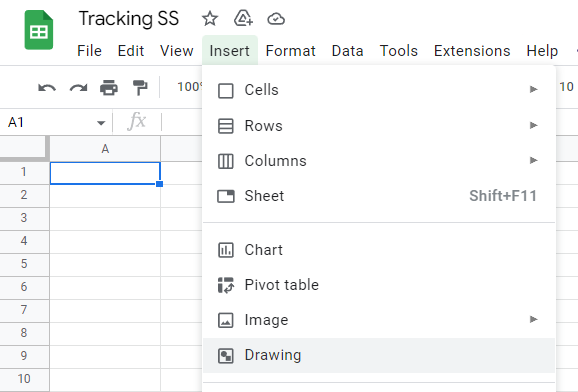
Perhaps the easiest and most straightforward way to learn Google Apps Script and put it to good use is creating custom buttons. It’s a two-part process: writing a small script, and then associating it to a drawing, where you can create an actual button (or if you’re lazy like me, write an emoji into it that will work as a button.)
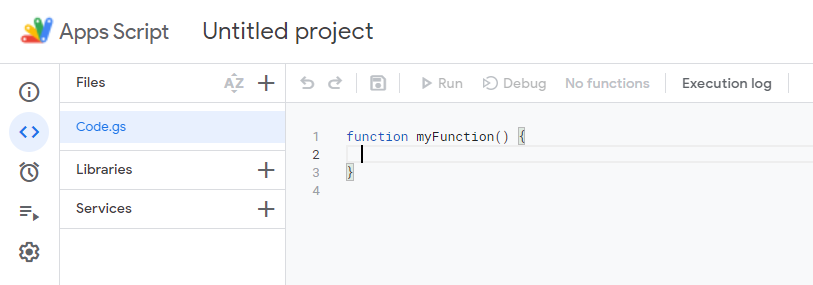
To start writing your scripts, you head over to “Apps Script” within the “Extensions” menu:
If you never used it before, you will find yourself on a page like this:
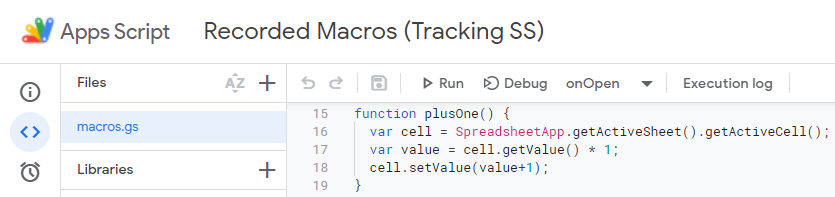
Or if like me you first started messing around with macros, thinking it might be easier (it isn’t), it might be called “Recorded Macros (your sheet name)”. Here below is the first function I wrote, which saved me some clicks when needing to add 1 to a value, back when I was counting things manually…
If you know anything about coding, the above will feel pretty obvious and you can safely skip the whole section, but I will talk about it a little bit for those that like me started from scratch.
First, let’s make the code more visible with a Gist (I just googled this):
What this does is described in the first comment line, and I was going to write a line-per-line explanation as well, for those of you who are beginners like I was when writing this, but this article would become super-long, so feel free to ask for details in comments, and I will be glad to go over it.
In any case, it’s all very well-documented by Google, and if the documentation seems a bit difficult at first, head over to Spreadsheet Dev, and look at the many how-to’s, which are explained in a much less technical way.
After writing this and saving it, you can test it by associating it with a button, which as mentioned is created from a drawing:
Which can even contain just a big emoji inside a text box, to make it quick:
Careful with the text box size: all its area will be clickable as a button, so make it very close to its content!
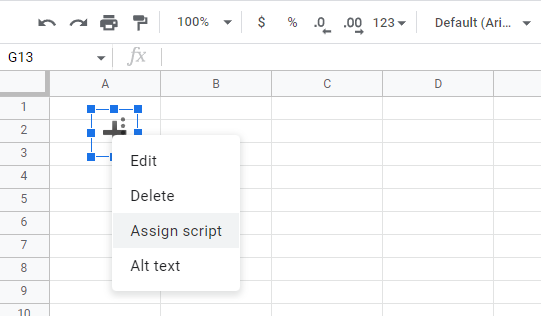
After you save it, it will appear in your spreadsheet and you will be able to associate the function you made, by clicking on the three dots appearing when you select it (they might overlap the contents and be difficult to see like here below), and clicking on Assign script, where you will just type the name of the function you just created.
And that’s it, a small step for a coder, but a big step for a noob!
Now, this is useful in very few scenarios, mainly when working in split screen and not wanting to switch windows a lot when counting some stuff.
But what if we want to make sure we update a specific cell based on some parameters, and not whatever is currently selected? In particular, let’s see how to do it in case what we need to count is based on the day of the week:
This one teaches something non-trivial: arrays and how they work, plus working with dates.
(Feel free to skip this if you understand how it works.)
We create an array with “Const Days = [‘B’, ‘C’, ‘D’, ‘E’, ‘F’]”. If you’re a beginner, you can think of this like an ordered list, where those letters will always be in that order, and be accessible by their position, with the first being in position number 0. For example, Days[1] will refer to ‘C’, while Days[0] to ‘B’.
Note that these are meant to refer to cells, which in the so-called A1 notation are described by a letter for the column, and a number for the row. The columns in these cases referred to days of the week, with B being Monday, and F being Friday (by chance.) So how to let the script know where to write, based on what day it is?
By playing with the array index and the “getDay()” function, which gives a number depending on the day, from 0 for Sunday to 6 for Saturday. Therefore, if we want Monday to be associated to letter B from the “Days” array above, all we need to do is subtract 1 from the getDay() value: like in the line “const Day = Days[Today.getDay()-1];”
The next line will get a Range (a group of cells, in this case just one cell) by associating the letter we stored as “Day” to a number of the row we need (in my case it was 50), using the easy way JavaScript gives to build a string from variables, chaining them with the + sign, like in “getRange(Day+50)”. Like this it will be B50 for Monday, C50 for Tuesday etc.
Enough with the basics, what about useful things?
This stuff was useful for a stats sheet I had, but quickly became outdated when I discovered how much more could be done with Google Apps Script. For example, why writing the statistics myself, adding stuff manually, when I can just calculate statistics automatically?
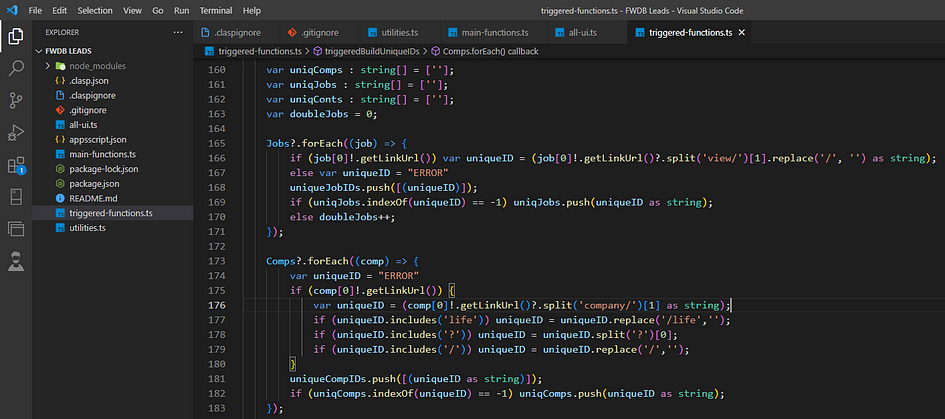
Here the code becomes quite long, and I can’t show you the sheet it works on since it’s where we keep all of our recruitment stuff, but here is a snippet from a function that classifies the daily work done in various arrays, perfect for compiling automated statistics:
There would be quite a lot to write about this, but in short, you can see the following interesting bits:
You can use sheets to store settings which you use to process other sheets! This is much easier than using databases, and with some setup work, it lets you change what a script does without touching its code anymore.
If you organize your sheet with some default values that always start in the same way, like in this case my “statuses” starting with numbers or letters, you can check their values easily and quickly by looking only at the first character of the cell value, instead of the whole cell.
Using the push() method of arrays is great for counting things and saving them in lists at the same time.
Using arrays instead of separate variables for concepts like contacts that are new, to-be-contacted (TBC in the script) and contacted, I am then able to procedurally go through them by cycling through their index. It makes the code harder to read, but if you comment it properly, you can have the best of both worlds: the speed and brevity of doing things procedurally in nested loops, and code that can be easily explained.
All this stuff can be used to generate statistics either as popup messages, or full-on sheets:
Here I use the same bidimensional array to build a report that just gets displayed on screen via the alert() function, and copied to a sheet, since the setValues() function takes a bidimensional array.
I was also surprised by how the usage of a few emojis can make both the code and the result more readable and clear. Notice for example how I create toasts (popup notifications within the application) showing the time elapsed and what the script is doing, by showing a progressively later time in the clock emoji.
On an empty day like this Sunday, this generates all 0s, but here is the result for you to get an idea:
As you can see, here a lot of titles of skills/positions are mentioned which were not on the script, because they come from a settings sheet:
It’s not pretty because I keep it hidden, and generate it from another script, and another document: you can make your sheets talk to each other this way!
But what about the HTML and CSS? Where’s the UI?
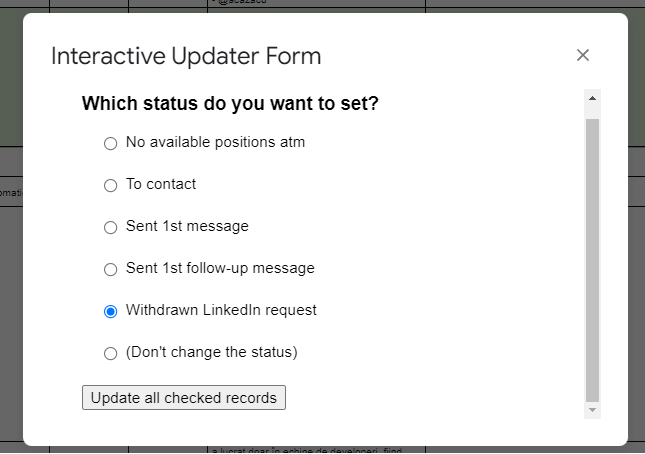
Well, at some point I made something like this:
It’s HTML with simple CSS, and it talks with Google Apps Script, and is done from the same Google Apps Script interface.
It seems trivial stuff, but when combined with the checkboxes I added to the sheet, it could save me a lot of time (especially in cases in which it needed to calculate a specific reminder for some actions, which I was previously doing manually.)
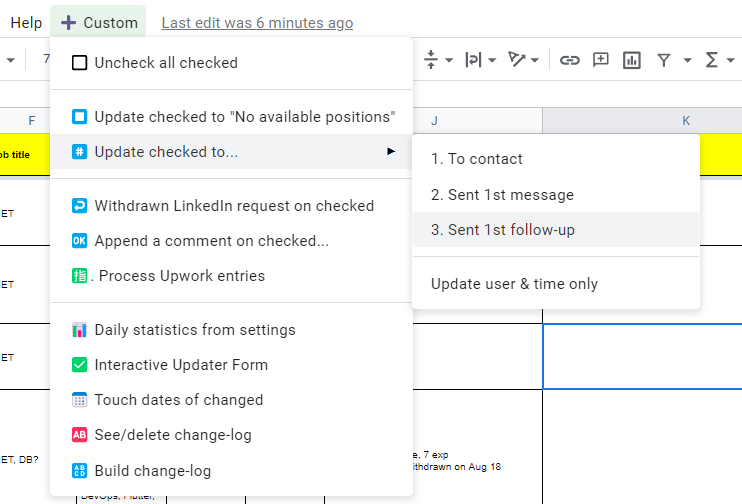
However, I realized it was much slower to display such a window to start my functions, compared to having them in a custom Google Sheets menu which you can easily build!
A lot can be done this way, but still, nothing compared to what can be done with time-driven triggers to fully automate some tasks, or what I managed to do writing my own Chrome Extension for internal use, which interacts two-ways with my Google Sheets, without even asking me anything. As mentioned before, I think the best UI for productivity is no UI at all..!
Next time I will dig into these topics, showing also how to step up the game by using a standard development environment instead of Google’s nice but limited interface, and switching to TypeScript.
Now it feels like coding for real! 😀
If you were not into coding and you have questions about the code snippets or how to do other things, please feel free to ask in the comments, or directly to me, maybe by contacting me on LinkedIn.
No such thing as a stupid question, and by explaining to me what you’re trying to achieve, you might also give me a good idea for a new script or app.
In any case, whether you felt like this was trivial or difficult, I totally recommend starting to try this stuff yourself: it taught me many things, increased my productivity, and even improved my logical thinking in general!
Also do not hesitate to join our FusionWorks team to work together, we have lots of brilliant products in the pipeline.
User authentication is a functionality every web app shares. It should have been perfected a long time ago, considering the number of times it has been implemented. However, there are so many mistakes made and vulnerabilities that haven’t been patched yet.
Below is a list of best practices regarding user authentication. This list will cover as many of the related pitfalls as possible. So here is the list of things that will make your backend authentication mechanisms much more secure:
Always use TLS. Every web API should use TLS (Transport Layer Security). TLS protects the information your API sends (and the information that users send to your API) by encrypting your messages while they’re in transit. In case you don’t use TLS on your website, a third party could intercept and read sensitive data that is in the process of transfer.
Use bcrypt/scrypt/PBKDF2 for password storing. Don’t use MD5 or SHA, as they are not the best for password storage. Long salt (per user) is mandatory (the aforementioned algorithms have it built-in).
Use API keys to give existing users programmatic access. While your REST endpoints can serve your own website, a big advantage of REST is that it provides a standard way for other programs to interact with your service. To keep things simple, don’t make your users do OAuth2 locally or make them provide a username/password combo — that would defeat the point of having used OAuth2 for authentication in the first place. Instead, keep things simple for yourself and your users, and issue API keys.
Use CSRF protection (e.g. CSRF one-time tokens that are verified with each request). Frameworks have such functionality built-in.
Set session expirations to avoid having forever-lasting sessions. Upon closing the website tab — the user’s session should expire.
Limit login attempts.
Don’t allow attackers to figure out if an email is registered or not by leaking information through error messages.
Forgotten password flow. Send one-time (or expiring) links to users when trying to reset a password.
Use the secure option for cookies. It will tell the browser to send cookies over SSL/TLS connections.
Don’t leak information through error messages — you shouldn’t allow attackers to figure out if an email is registered or not. If an email is not found, upon login, just report “Incorrect credentials.” On password resets, it may be something like “If your email is registered, you should have received a password reset email.” This is often at odds with usability — people don’t often remember the email they used to register, and the ability to check a number of them before getting in might be important. So this rule is not absolute, though it’s desirable, especially for more critical systems.
At FusionWorks we enjoy using the NestJS framework, which helps a lot to keep our Node.js code clean and well-structured thanks to its modular architecture. But what if you only have Express at a hand? Could we achieve something similar?
Image generated by MidJourney AI for “developer creates smart routing system using Express”
In this tutorial, we’ll set up routes with “dummy” handler functions. On completion, we’ll have a modular structure for our route handling code, which we can extend with real handler functions. We’ll also have a really good understanding of how to create modular routes using Express!
Let’s say we have three routes (/, /home, /about), each one with two different HTTP verbs (get, post).
Our goal here is to create a separate file for each path and make use of the Express Router object. The Router object is a collection of middleware and routes. It is a mini-app within the main app. It can only perform middleware and routing functions and can’t stand on its own.
By having each route in its own file, we’re achieving a less messy code in the index.js file. The problem that still persists here — is that every time we add a new route file, the main file has to change as well, in order to map the path to the file.
Achieving a greater number of routes — produces the same problem: the main file gets bigger and messier.
We can solve this issue by creating a separate file that maps all the other routes and making use of it inside the main file.
The routes folder index file receives the app instance from the main file and makes the path mapping. Now we have a cleaner main file, but we still have the problem that it’s required to manually map each path to its file.
This can be improved if we would loop through the routes folder’s files and map them accordingly. We’ll be using the filesystemreaddirSync method. This method is used to synchronously read the contents of a given directory, it also returns an array with all the file names or objects in the directory.
In today’s article, we’ll be building a complete JWT-based authentication module with logout and refresh functionality. Also, we’ll get through on how to use access and refresh tokens with PassportJS and NestJS. But first, let’s understand how this mechanism works in theory.
Image generated by MidJourney AI for “json web token protects API from hacker attacks”
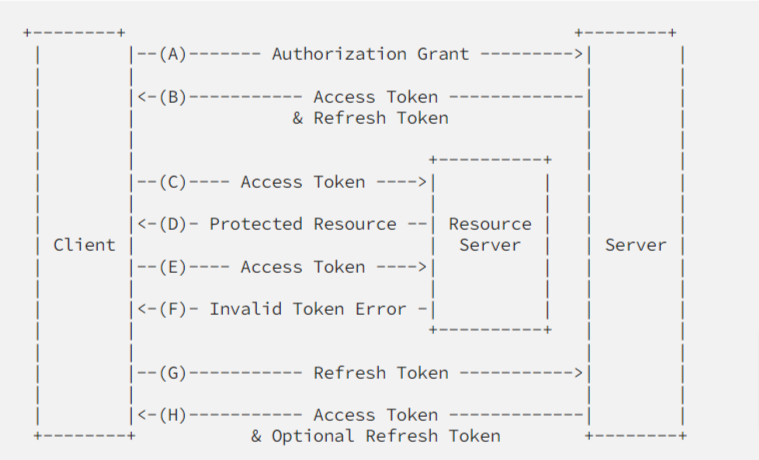
After authenticating successfully the client receives an access token.
The client provides an access token every time a protected request is made.
The server checks if the access token is valid, if so, the request is successful.
In case the token is invalid, the server throws an error about the token being invalid.
The client is able to get a new access token by authenticating or refreshing it by presenting the refresh token.
The server validates the refresh token, and if valid, issues a new access token and a refresh token.
Now that we have a solid grasp of how the mechanism works in theory, let’s try and put it into practice.
Prerequisites
In this guide we’ll be using regular REST for our endpoints and Prisma as our ORM system, we’re also gonna need a hashing library to hash users’ passwords and tokens — we’ll be using bcrypt. For our authentication strategy, we’re gonna installnestjs/jwtand passport-jwt.
We won’t cover the project setup or the Prisma & JWT setup, since this is not the purpose of our today’s article. You could check the respective NestJS documentation if you need more details on this:
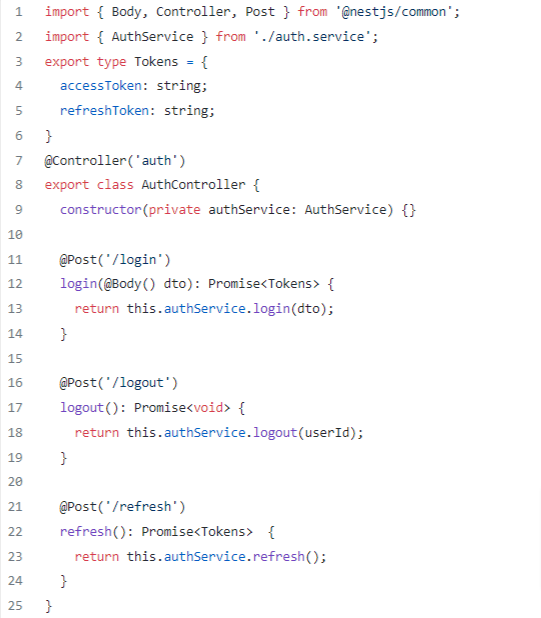
Once done with the basics let’s dive in by setting up our authentication controller:
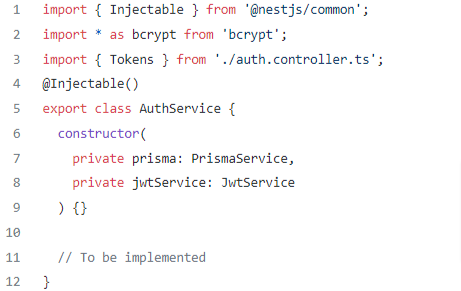
And the authentication service should look like this:
Now let’s add our first method in our auth.service.ts to retrieve a user’s tokens, use env variables for the expiresIn field, the refreshToken expiration time is usually about a week and the accessToken expiration time should be about 15 minutes.
Let’s also add a method that will update a user’s hashedRefreshToken field, see more here.
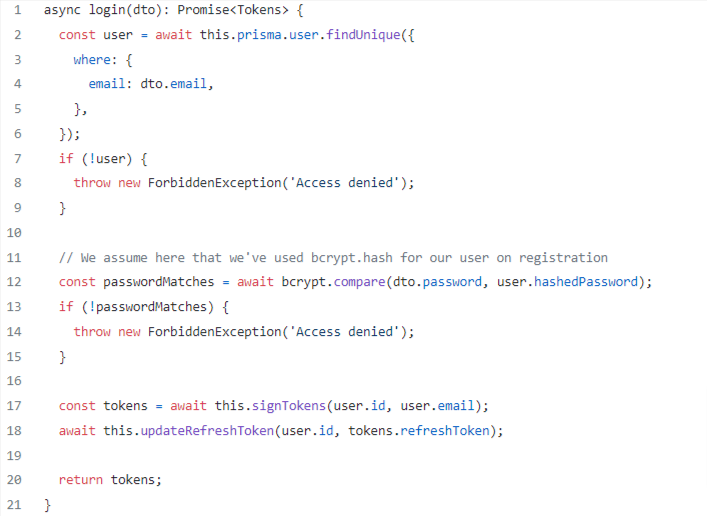
Let’s implement the login functionality inside auth.service.ts, we’ll be using the above-implemented methods, signTokens and updateRefreshToken:
So what happens here is — that on each login, we supply the client with fresh tokens and update the current user’s state with a hashed token which will be used in the future to refresh both the refresh token and the access token.
Let’s implement both the logout and refresh methods, the logout method will delete the user’s stored hashed token and the refresh method will compare if the issued token matches the one stored inside the user, if that’s the case — it will issue the client a pair of fresh tokens.
Let’s move on to our auth.service.ts, see more here.
Pay attention that our logout and refresh method — received userId as a parameter, we’re not gonna pass that parameter inside the body of our request but rather get it from the JWT of the current user — we’ll achieve that by implementing both strategy and guardfunctionality (we’ll use the @nestjs/passportAuthGuard for now), it will help to manage the state of the authenticated users (by issuing JWT tokens in our case and verifying their credentials).
We’ll need 2 different strategies, one for accessing all the endpoints and one for our refresh endpoint.
The first strategy will decode the JWT from the request, by setting the ignoreExpiration to false — it will also check its expiration and send it back through the AuthGuard, so we’ll be able to access it from the Req() decorator (by default under the property user).
By setting the passReqToCallback to true inside the second strategy, we have access to the request object inside the validate method, the “refresh strategy” will take the refresh token from the authorization header and send it to the controller through the AuthGuard.
Let’s proceed by implementing our strategies first:
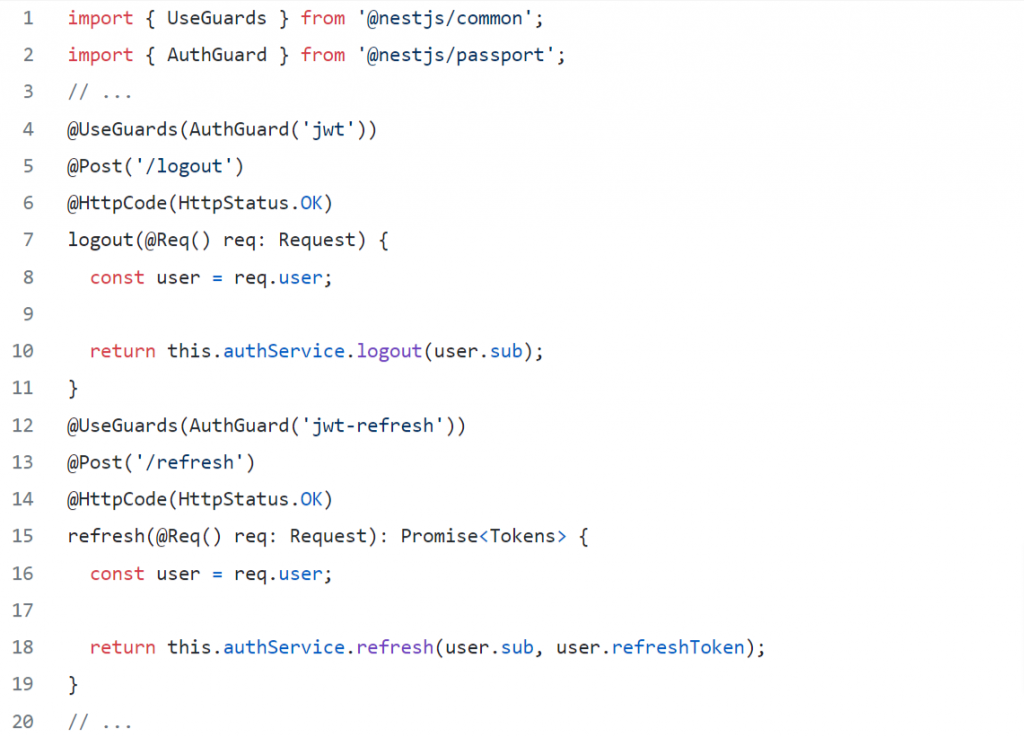
Now, let’s update our logout and refresh endpoints inside the auth.controller.ts, we’ll pass our newly created strategies to the AuthGuard which will be passed inside the @UseGuards decorator, thus our endpoints will be secured accordingly, that way we’ll create a connection between our endpoint and the created strategy and we’ll have access to the request object that is fulfilled with JWT data inside the strategy.
So let’s go once again through what’s happening really:
The logout endpoint is secured by our guard that implements the jwt strategy, thus it can be accessed only if the client provides a valid access token, if the access token is invalid — the refresh endpoint should be called by the client to ask for a new pair of tokens.
The refresh endpoint has one important job — to let the client refresh his tokens (without having to log in again), in case the provided refresh token by the client is not valid, the user is forbidden from accessing any endpoints other than login (in the case of our guide).
So now — we have our own refresh token mechanism implementation. This can be improved of course by creating a custom AuthGuard for both of our cases (access and refresh), we may also create a custom decorator that will return the JWT data from the ExecutionContext, instead of accessing the Req() decorator.
Bonus
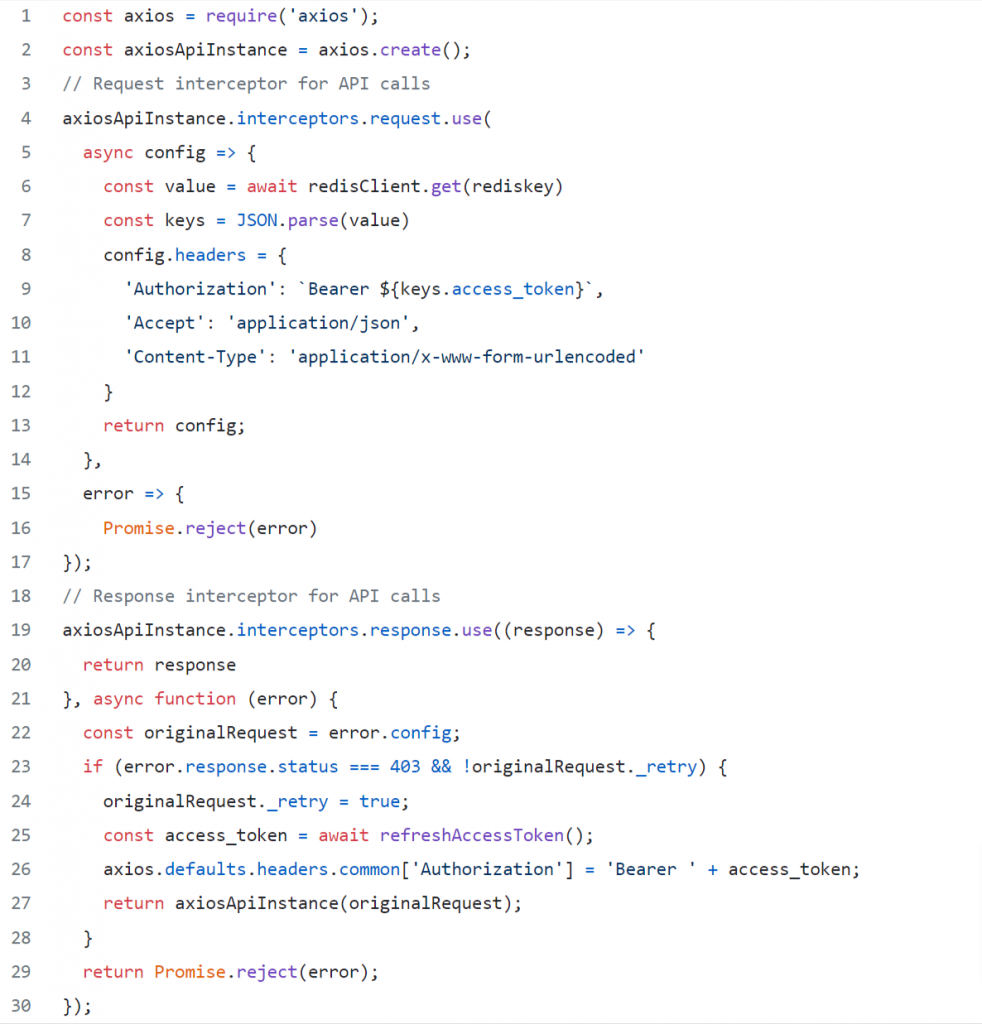
Since we have the backend implementation, let’s try to go through the frontend part. As was mentioned before, the client asks for new tokens using the refresh token as soon as the main token expires, and then the client needs to use the freshly retrieved token for the next API call until that token expires as well. You can send the request for new tokens after the first 403 response for example, but in this guide, we’ll be using Axios for the HTTP requests and Redis to store the tokens:
The response interceptor verifies if the server returned a status code that shows an access token has expired. If that’s the case, a function that refreshes the access token gets called. That function returns and stores the tokens in Redis.
In this article, we’ll talk about how a company’s values and culture help it implement its strategies and mission. We’ll start with some definitions and introductions and then will identify the possible issues and practical solutions.
Disclaimer: we’ll be using an IT company as an example, so some aspects may appear a bit subjective.
Values, Mission, Strategy
The mission defines the company’s global goal, while strategy leads to its implementation through culture and values.
To develop high-tech products the world and future you will be proud of — FusionWorks
Company values must change through the years. Not because the old ones were bad, but because they are bad for what the company represents now. This is a normal process of getting mature. Just see how Uber changed its initial ‘pirate’ values into more enterprise ones — or you may watch the “Super Pumped” series instead. The same changes we experience in our personal lives. Several times. If not — this is a sign to think your life over.
At FusionWorks, we are going through the same process over and over again, sometimes it’s painful and time-consuming. There are core values such as honesty, openness and inclusion that should not be changed, but upgrades are inevitable for lots of things you thought are here forever. I love this process, but you? Will be great to see your thoughts in the comments.
Values determine the company’s culture code. Here are some aspects of why culture is so important:
Culture is not the thing you write in the company’s employee handbook, it’s what people talk about when you are not around.
Strategy is a promise, corporate culture is the execution.
Culture eats strategy for breakfast.
Culture is formed around what you do, not what you say. If you say you are a company that values health and wellness but then brings in doughnuts every morning there is a disconnect. It’s fine to value doughnuts, who doesn’t love them but it’s not ok when your words don’t match your actions. It kills the trust you have in your team.
Job seekers are most likely to choose one job over another because of the chosen employer’s culture, according to talent acquisition professionals surveyed by the Korn Ferry Institute.
Having this said, a strong company needs to make sure it has its culture code and it’s working. At FusionWorks we use the people and culture approachwhichis a more progressive way of dealing with people. It is people-based, not policy-based.
If you treat people like people, they will be happier.
We can have a meaningful impact on people’s lives by giving them a working environment where they can be themselves and thrive. Understand and help your team grow together through positive activities and encouragement.
Manifesto
The manifesto is a more deliberate expression of your values and also supports the mission you have. It’s typically an emotional story that captivates your audience, emotionally connects with them, and persuades them to support your brand. It’s always a good idea to have it before we proceed to practical steps.
We build a no-bullshit company. No secrets, no lies, transparent, accountable, driven by facts, respectful to all. Openness in every aspect.
We love being tech-oriented and this infuses everything we do.
We believe being people-centric motivates and inspires much better than policies and control.
We are committed to being learning-driven, changing with the world, changing the world.
First, let’s list the things that may make employees unhappy. It doesn’t mean your company has all of them, but they should be considered:
Lack of progression and self-development.
Unsatisfactory salary or benefits.
Unhappiness with leadership.
Lack of flexible schedules.
Boring tasks.
Negative experience/incident.
Lack of recognition.
Dissatisfaction with the company culture.
A need for better work-life balance.
So here we go with implementing the People and Culture strategy. We aren’t forgetting about Human Resources, we value it and everything that goes along with it. HR is policies, procedures, and paperwork — all extremely important. But remember, People and Culture is people-based, not policy-based.
Once the employee has been onboarded (by the fabulous Human Resource team), it is time to improve their well-being, integrate them into the company, and show their value. This engagement improves productivity, creates a positive environment for the employee to thrive in, and generates happiness. Lower turnover, happier employees, and better work.
When we identify the issues, we may choose from the solutions below (not all of them work for all companies).
Supporting employees with talent and career development programs
Implement the grading system — Roles and Levels — and make sure it’s well-defined.
Assign employees to their current Levels. Explain their Roles.
Clearly define the steps to progress to the next level.
Revise the employees’ levels once in 6 months.
Acknowledge employees’ successes.
According to LinkedIn, 94 percent of employees would stay at a company if it invested in their career development.
Development programs should be designed to ensure alignment between your expectations for top talent and the organization’s goals and vision. Professional development can include coaching processes, training seminars, networking opportunities, mentoring, special projects, and more.
Creating a more flexible schedule
The reason for that is the world trend toward remote work. So if it is possible with your company — consider it.
Allow flexible schedule.
Allow remote work if possible.
Encourage a healthy work-life balance.
Many employees value a flexible work environment over compensation. In fact, 72 percent of employees would search for new opportunities if their schedule wasn’t flexible. Implementing changes to work policies can help improve retention rates.
Implementing a feedback and performance appraisal process
Regularly get feedback from clients (once in 3-6 months).
Pass feedback to employees.
Feedback is especially useful during the development of retention plans, and 82 percent of employees appreciate it. Feedback is essential in a remote environment; it establishes a benchmark for behaviors and skills and highlights what employees need to remain happy with their employer. Companies must be open to listening to employees and implementing changes and actions required to keep top talent.
Employee turnover can be reduced by up to 31% by managers acknowledging employee successes. Source.
Offering challenging projects where people matter
Work with the clients directly.
Work on interesting projects that matter.
Make sure the clients listen to the voices of the employees.
Make sure our employees are growing and learning on the projects.
Fire bad clients.
Developing an effective employer branding strategy
Showing you are great or being great? Both. Showing your successes with no real wins doesn’t work long-term and leads to internal discontent. Being great without showing this externally won’t make the employees feel proud of the company, as well as your potential customers and employees won’t know how beautiful you are.
Companies are u̶g̶l̶y̶ copies of their founders.
People want to work in a company which grows together with them, faster than them. Also, they rarely work for those and with those whom they don’t respect at least professionally, who are weaker.
Plan marketing strategy: current employees, potential employees, and customers.
Communicate company strategy, mission and successes both internally and externally.
Engage employees in the company’s activities.
According to a LinkedIn study, a strong employer brand can reduce turnover by 28 percent and the cost of hiring by 50 percent.
The communication and dissemination of the company’s image and actions are key to maintaining employees’ interest in remaining with the company and contributing to its success through specific projects.
46% of employees stated that a lack of transparent leadership communication is driving them to seek new employment. Meanwhile, 79% of highly engaged employees have trust and confidence in their leaders. Source.
Making culture work
Clearly define the company’s mission, culture, and values.
Show employees the big picture and goals.
Explain mission and values.
Believe in your mission and values. If you don’t believe — change them.
Follow them — management should be an example.
Show how mission and values work in practice.
Offering competitive benefits
Offer what others have.
Offer what others don’t have (to stand out).
Offer benefits that make employee’s life comfortable and disappear when they leave the company.
Companies that offer competitive compensation and benefits can see 56 percent lower attrition. With the ever-changing labor market, companies need to adapt to employees’ evolving and growing needs and expectations. Nowadays, the most valuable benefits include remote work flexibility, employee discounts, time off, and financial advice.
Creating an open environment
Encourage employees to speak and voice their concerns, ideas, and opinions.
Treat all employees equally, on all levels. No favoritism.
Treat your employees as you treat your best customers.
Create an environment where everyone feels comfortable and safe.
No one wants to feel excluded in an organization they are a part of. New hire wants to feel like they were hired for a reason, and that they are playing a key role in helping the business achieve its objectives.
Josh Bersin, founder and principal at Bersin by Deloitte, found that companies who deliberately work to encourage inclusion, diversity, development planning, and leadership development in their culture were 3.8 times more likely to be able to coach people for improved performance, 3.6 times more able to deal with personnel performance problems, and 2.9 times more likely to identify and build leaders. Source.
Instead of epilogue
In the final chapter, I’d like to show you the FusionWorks values we believe in and share with the team. They determine our culture code:
Shared understanding in everything we do. Nobody has a monopoly on the truth. Decisions are made together and actions are reasoned on all levels.
People over processes. We encourage independent decision-making and believe in the power of freedom and responsibility.
Building cognitive diversity. Inventions are done by teamwork with people with different mindsets and competencies.
Building quality products. The things we do determine who we are, create our reputation step by step and reflect our eternal pursuit of excellence.
Learning never stops. We believe gaining knowledge is a continuous process and help you invest in your education for mutual benefit.
Sharing is caring. We share our experience — successes and failures — to help others learn and grow.
Building long-term relationships. Both our employees and clients are the people we want to work with long-term.
Learn, make impact, have fun. We always support initiative, awareness, quality, spirit and creativity. As simple as it sounds.
”…the most efficient way to make your employees happy is to understand their needs and mindsets.” — FusionWorks
A happy employee is a productive one. This is why it is very important to understand what makes not any, but YOUR employees happy. Knowing the individual motivators we may share care and strengthen what really matters.
Yes, it is priorly to allocate resources for employees’ motivation. What drives someone starts with communication. An empathic, non-violent (reading recommendation), and assertive one — this is when we learn to understand our employees, not only pretend we do. Mental and physical health at work is totally dependent on the working atmosphere. If you need a healthy employee you have to work on his / her well-being. This is a long process. Do not be scared or afraid when results will need time to be seen. This is normal. Below will be listed some crucial axioms to control and influence your employee motivation and in this way — to help them become the best versions of themselves. All of these were summarized while tested in time, on different employees (the difference was in one or some of these factors: age, gender, interests, temperament, education, and background), and could be used as steps for employee-admiration.
When satisfaction and benefits are in a correlation with work-volumewe see a happy employee. We may easily monitor this correlation with 3 simple tools: 1–1’s, onboardings, performance review (in ideal cases onboardings and performance review meetings will be conducted by TL & HR), questionnaires (with direct questions and metaphorical ones, anonymous and not). Honestly, first in this list is my favorite tool, as during 1-on-1 it is very easy to understand the person you interact with. And this is much more than words. Here every single gesture is special and every single selected topic is crucial. Without a psychological background, things could be a little more challenging, but we are so lucky! A lot of information is available online and after some search and good reading — anyone could coordinate an awesome 1–1. Another advantage is that no 1-on-1 is the same. So, this kind of discussion is fascinating!
This article is powered by Empy.io — an all-in-one tool that helps HRs synchronize with the employees and handle all the internal requests in one single place. Try it for free!
2. Leaders influence employees. All of us need approval, no matter how old or how experienced we are. Being in a room where you have a leader, you need to understand that he/she is here for you. That you may ask anything and you will receive the needed / correct answer. The easiest way to influence your employees positively is to be an example they would love to follow: do not be afraid to ask for help (we are all humans, we all need help sometimes with something, and this is normal), do not doodle from answering questions (even if tricky ones. Find a real response and operate with it). If you want something to be changed, be the first who not only is ready for a change but has already begun this brilliant process: take different tasks, enroll in different pieces of training and projects (why not along with your employees).
3. A constructive, positive, and empathic attitude towards your employees encourages them to express their ideas and visions freely, to communicate as openly as possible, without fear of making mistakes or being judged. They said people never leave jobs, they leave bosses or teams. So help your team be the one everyone dreams to become a part of. Steps to be taken: grow a collaborative work-culture (team responsibility — team decisions, brand bearers while participating in different non-work-related activities), cherish your team (praise concrete behavior, encourage employees individuality, create a context for creativity expressing).
The most important, but at the same time, the most beautiful way to make your employees happy is to understand everyone’s needs and mindsets. Knowing what drives every single employee, investing in his/her wellbeing, we will reach the win-win solution: a happy employee is a productive one, a productive one is a valuable one, a valuable one is the loyal one. Loyal employees are the treasure any respectable company deserves.
“… procrastination is a well-known process: we leave the tasks for the last moment, then we panic.”
Your deadline is here. But your task is not in progress, it is not even started yet. And you do not rush to do it. You may recheck a 10th time if you have a new message. You may remind yourself about a very interesting video that must be reseen at this very moment. You are hungry. You have to respond to an urgent call. Yes, you understand that you need to work. Also you, as a rational being, understand that you have to force yourself to start this task/activity. But it is simply impossible. Yes, procrastination is a well-known process. We leave the things we have to do for the last moment, then we panic. Do you remember the Panic Moster Ted talk? This habit destroys us, but what would be the solution? Here are some options:
This article is powered by Empy.io — an all-in-one tool that helps HRs synchronize with the employees and handle all the internal requests in one single place. Try it for free!
1. Divide everything you need into small pieces. They say it is impossible to eat an elephant, but it could be done by breaking it into small pieces. One of the causes of procrastination is the understanding, on a subconscious level, of the excessive volume of the task. Focusing on small things we will be willing to quickly finish what we set out.
2. Change the work environment. Different environments have different impacts on our productivity. Choose where it is easier for you to do a certain activity.
3. Draw up a calendar and set deadlines for every particular activity. Having a single deadline for all activities is like an invitation to procrastinate.
4. Eliminate distracting factors. One of the reasons for procrastination is the availability of other occupations, so limit your access to what distracts you. Put the phone on silent, close all tabs where you do not work, do not leave any opportunity to escape!
5. Communicate with people who inspire you to action. The people in our entourage directly influence our behavior. By interacting with other people, each of us takes something from the interlocutor.
6. Clarify your goal. Maybe the cause of procrastination is the discrepancy between what you want to achieve and what you do. It happens that during our journey in reaching the goal, we grow and we already have other desires and needs. Instead of wasting time, take a break and decide what you really want to achieve.
7. Don’t complicate things. Are you waiting for a perfect time to start? Now is not the right time to start because x, y, z? Here’s a secret — the perfect moment will never be or is right now, you choose!
Several years ago we at FusionWorks launched our awesome tool for 360° photographers — Viar.Live. Its goal was to offer an easy-to-use tool for creating virtual tours from 360° photos. Viar.Live was warmly accepted by the users and we got a lot of positive feedback, but one email really surprised us: we were approached by Wix with the suggestion of joining their app market with our application, which we eagerly accepted. The journey was not easy since Wix has a lot of specific requirements with which we had to comply, but finally we made it through and now it’s time to present the results.
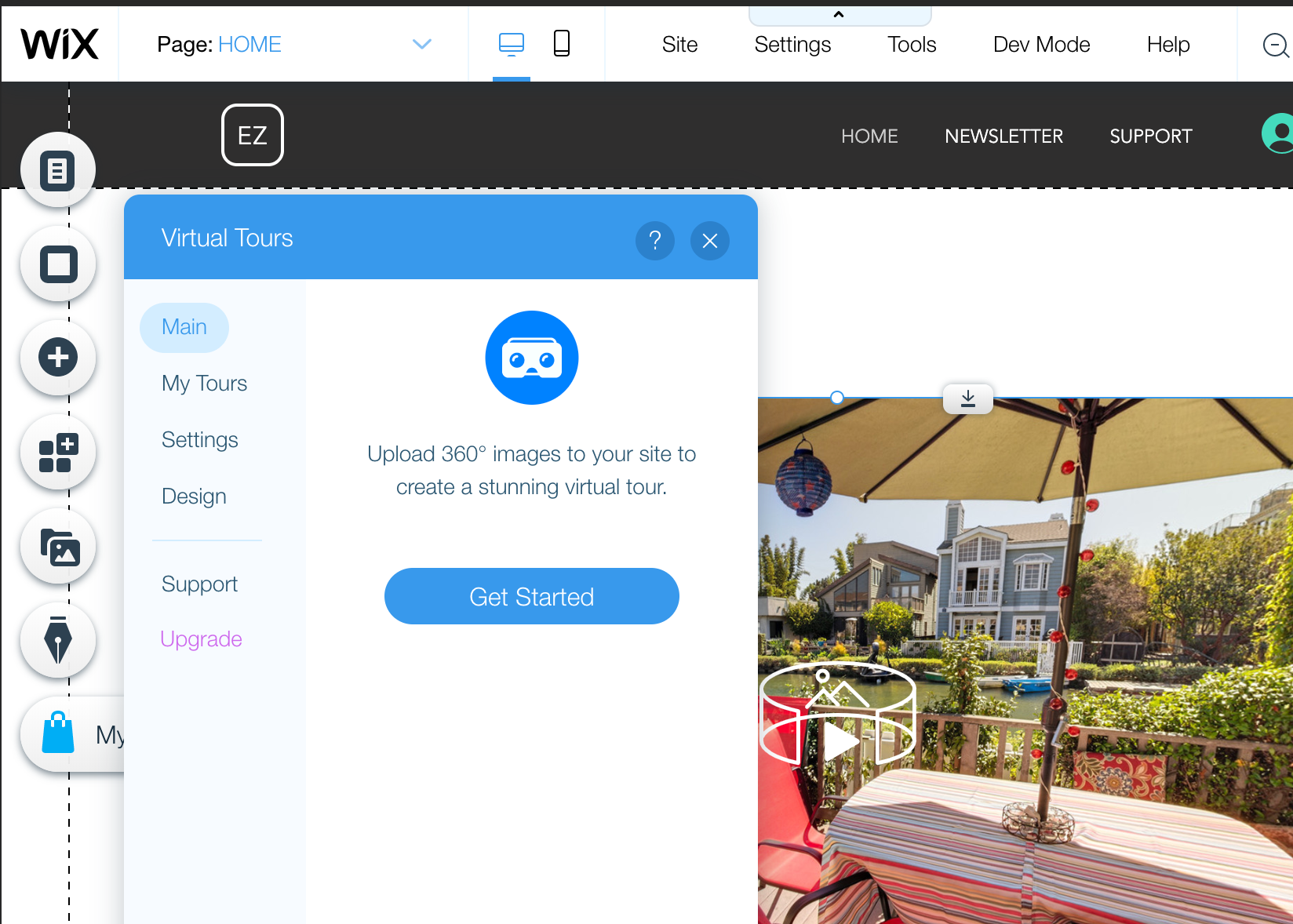
Finding the Virtual Tours app on the market place
Just type “Virtual” in the Wix App Market or follow this link and add our app to your website.
Creating your first tour
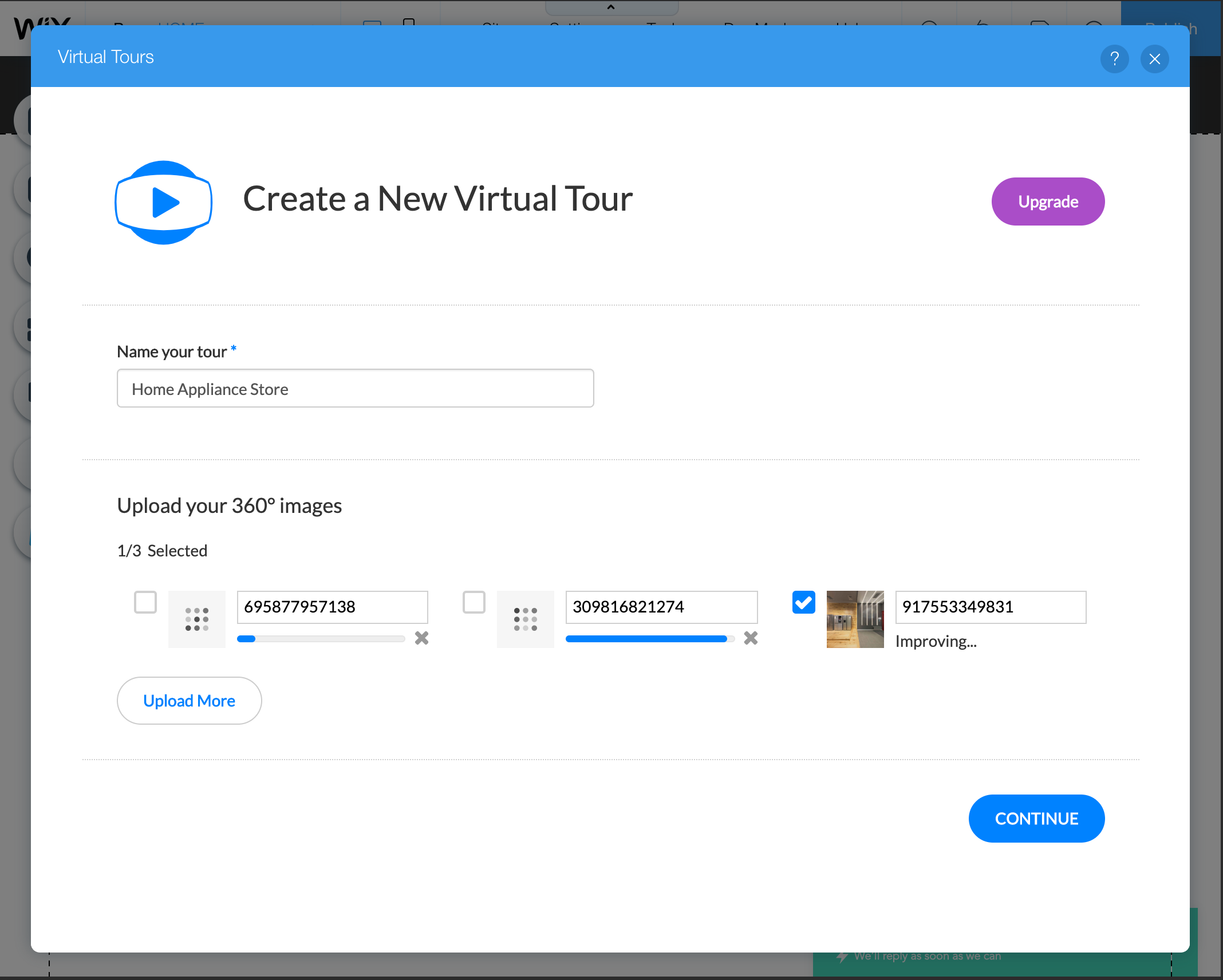
To create a tour you don’t need to specifically create a 360° photo — any panorama made on your smartphone will work. Just click “Get Started” in the application settings and upload your photos.
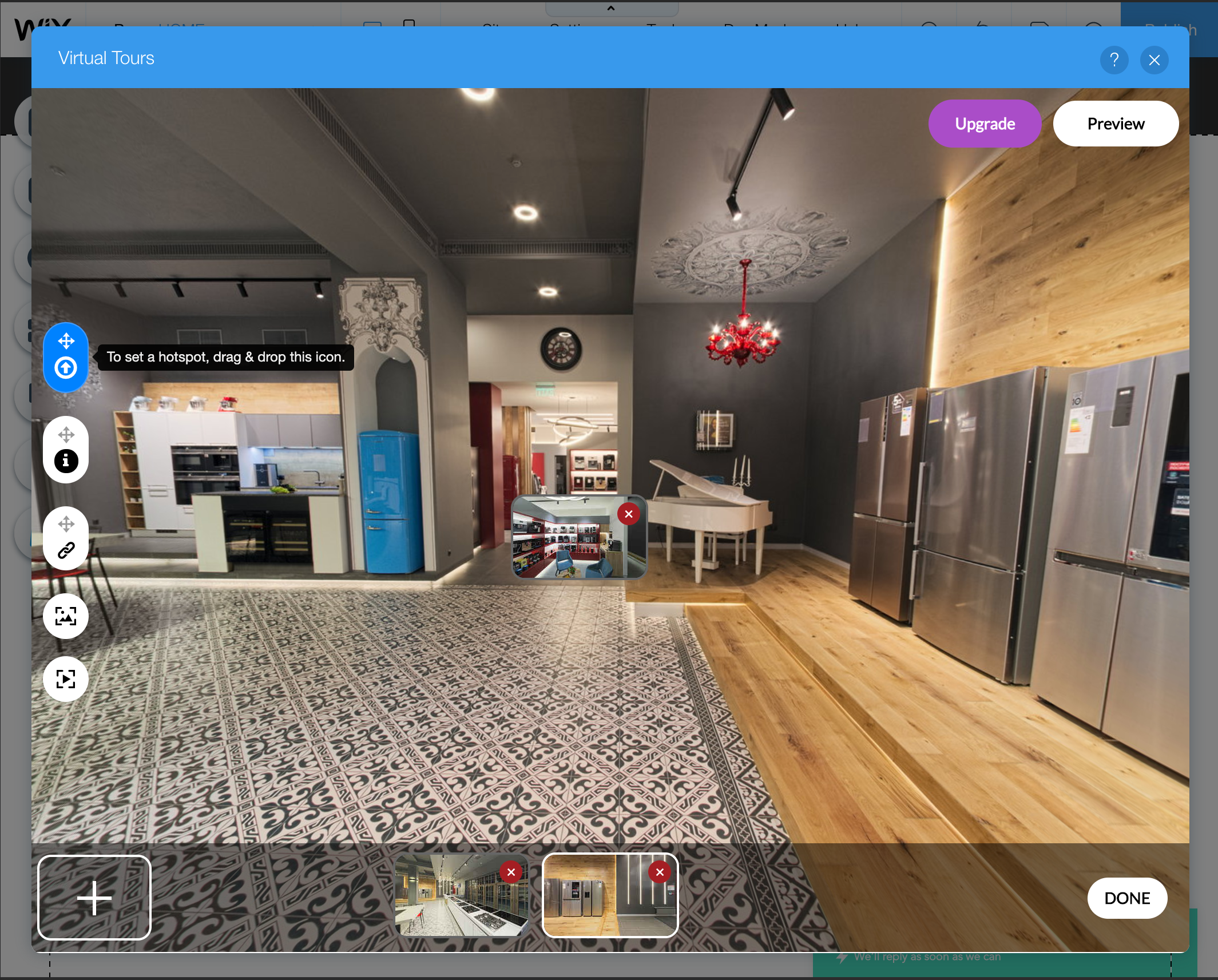
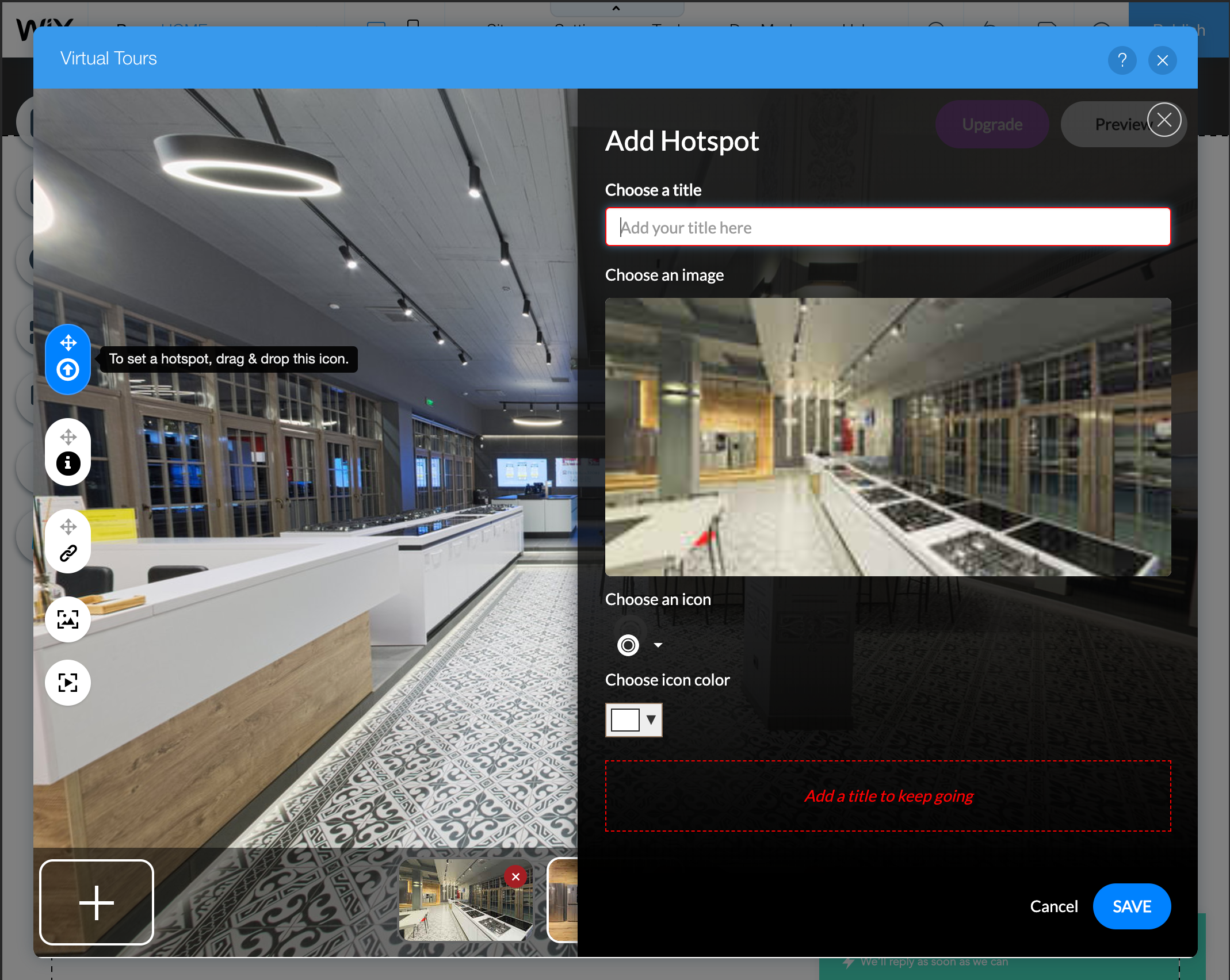
Once the uploading and processing are over, click “Continue” to proceed to the tour editor. Once in it, start connecting panoramas by dragging thumbnails into appropriate connection places.
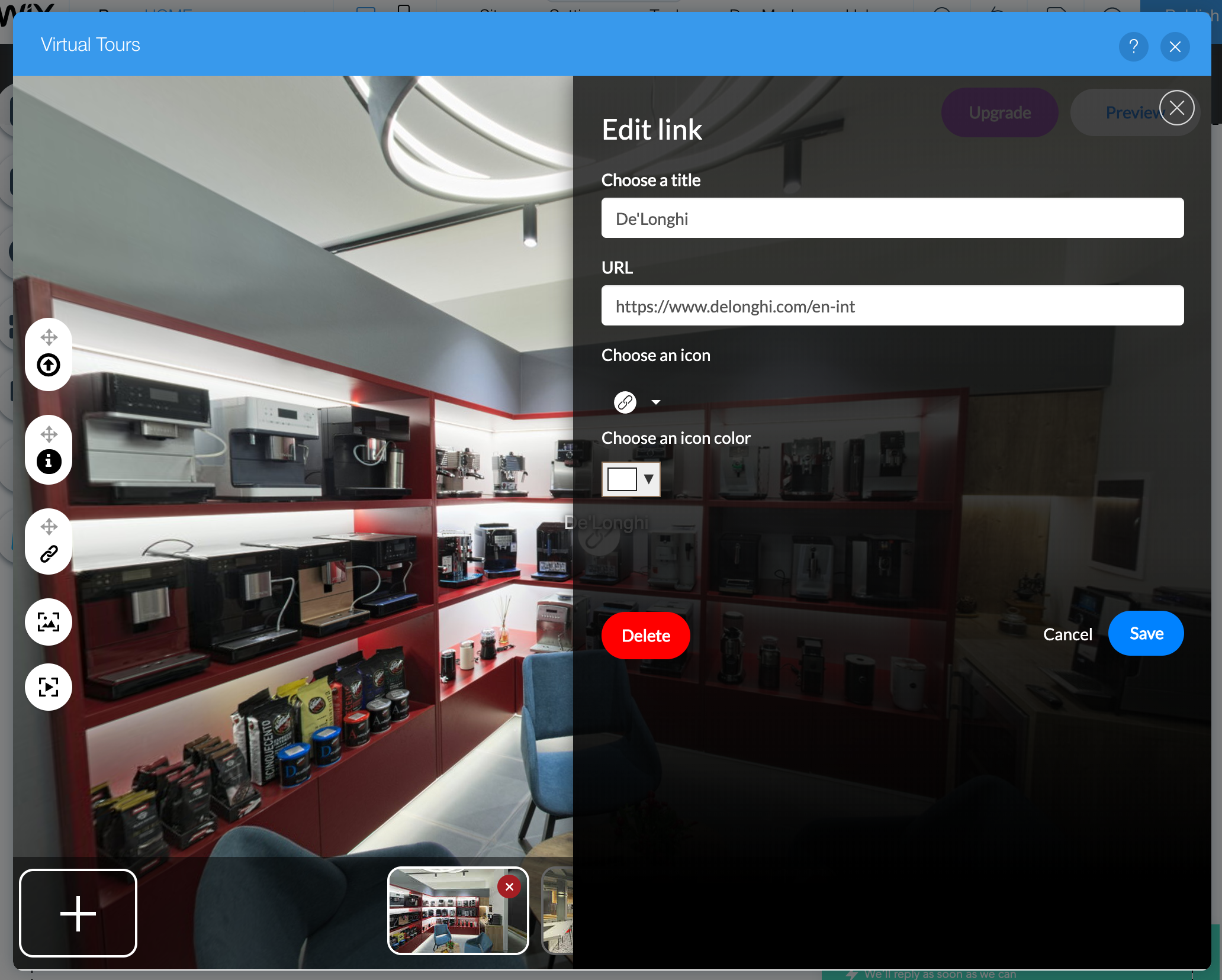
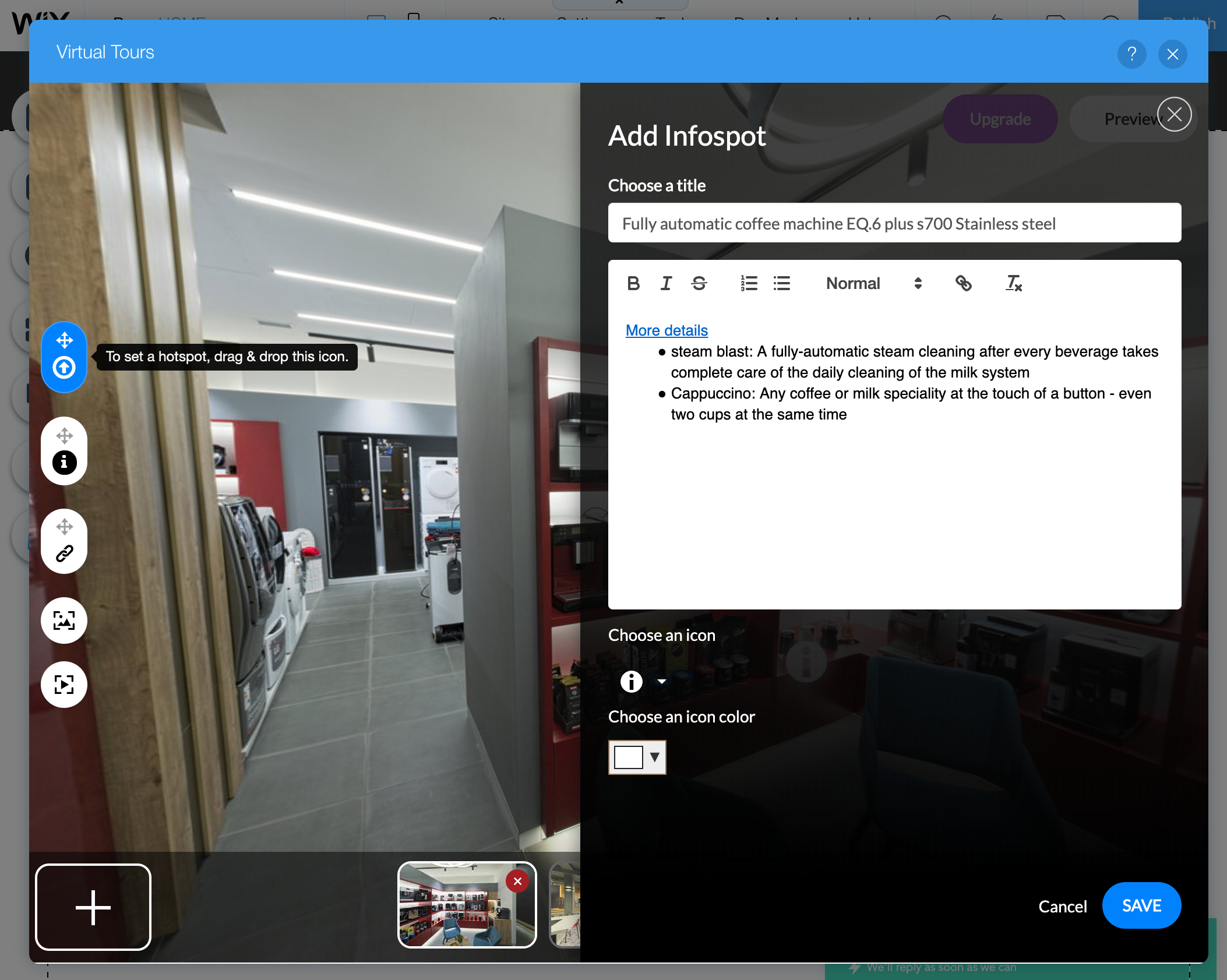
Besides connection points, you can also add link and information hotspots.
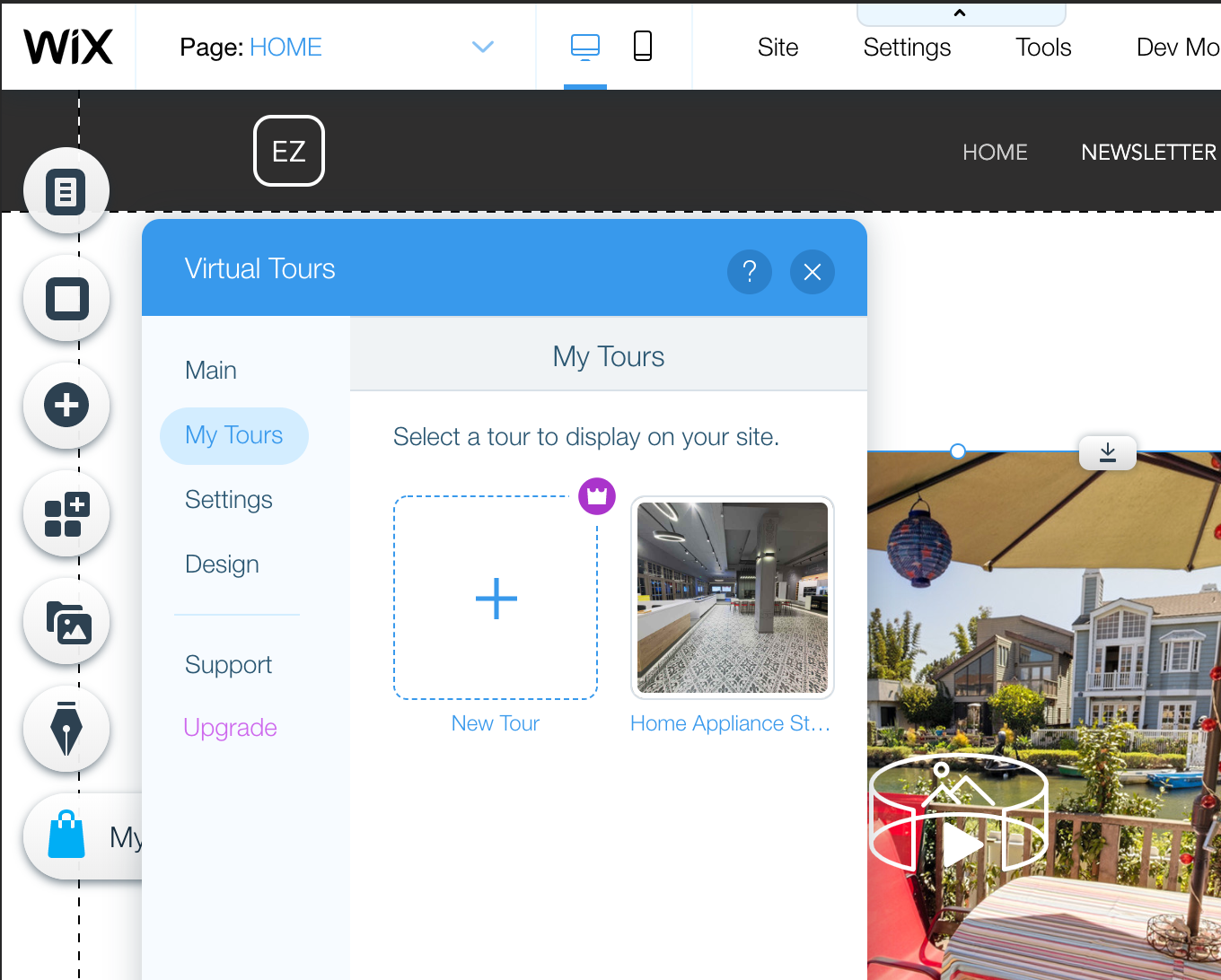
Once finished, just assign a newly created tour to the Virtual Tours widget and share your website!
In the first part, we showed how React Admin and NestJS can work together to quickly create a simple admin panel.
In this part, we will go a little bit beyond basic CRUD and cover the following topics:
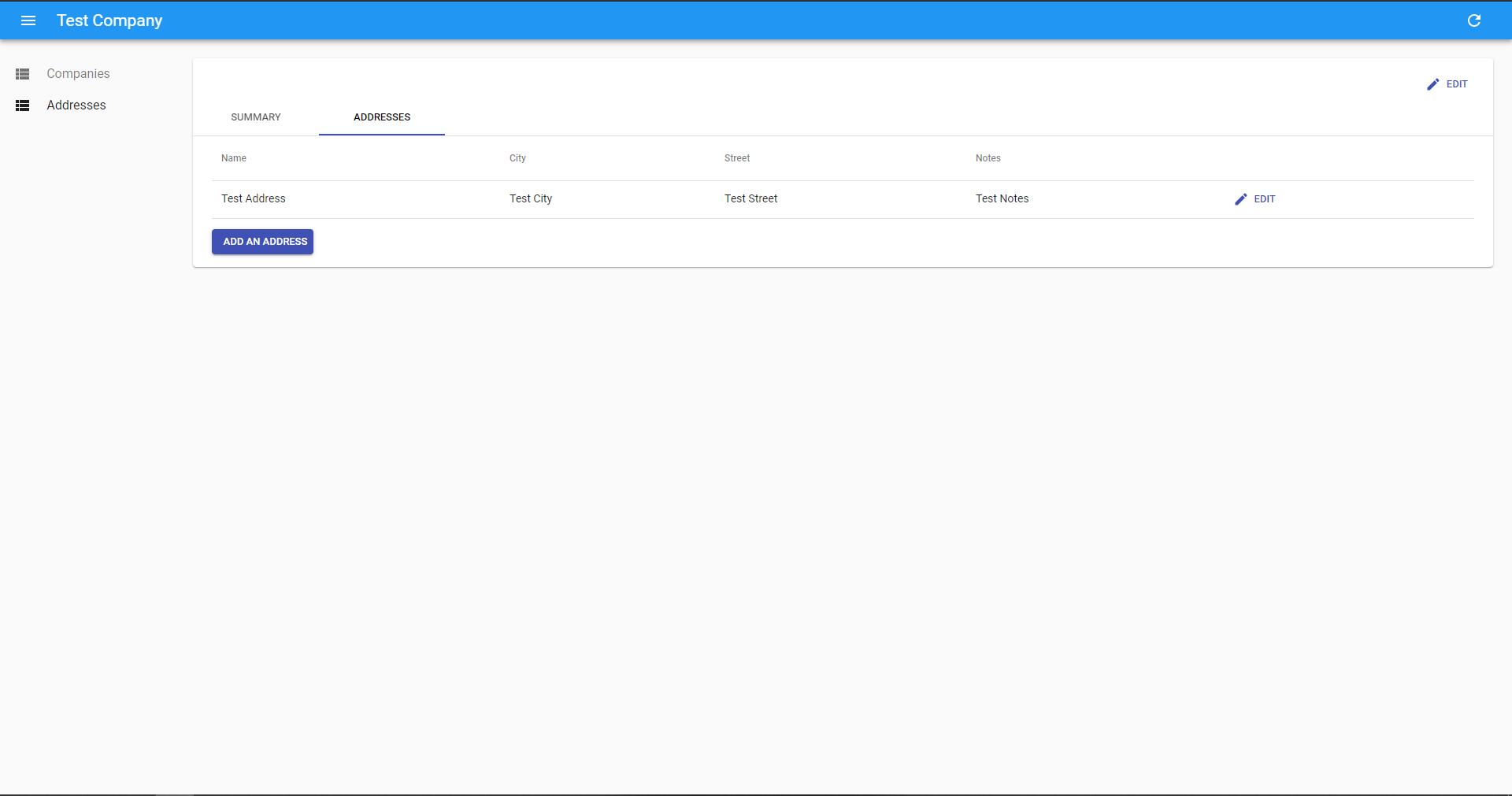
Handling one-to-many relationships
Handling file uploads to Amazon S3
Using the Google Maps input
Handling one-to-many relationships
To showcase this (and other points), we will change the domain model of our application. So instead of a guest list, we will manage companies and their addresses.
This will require the following entities and controllers to added to our API:
Company Entity with a declared relationship with Address Entity:
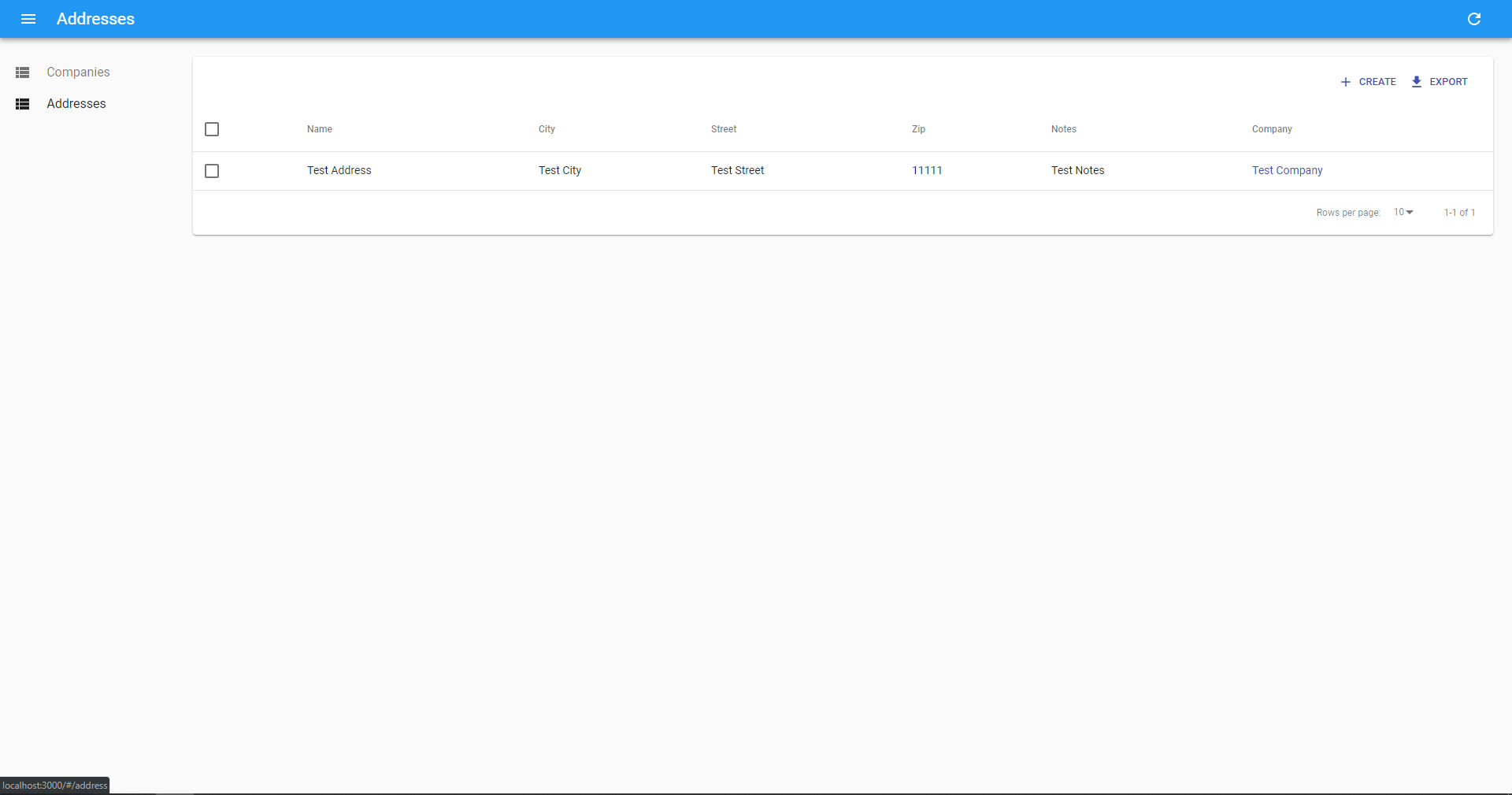
And finally, add an “Add address” button which will open the create address form:
import React from 'react';
import { Link } from 'react-router-dom';
import { withStyles } from '@material-ui/core/styles';
import { Button } from 'react-admin';const styles = {
button: {
marginTop: '1em',
},
};const AddAddressButton = ({ classes, record }) => (
<Button
className={classes.button}
variant="raised"
component={Link}
to={`/address/create?companyId=${record.id}`}
label="Add an address"
title="Add an address"
/>
);export default withStyles(styles)(AddAddressButton);
Handling file uploads to Amazon S3
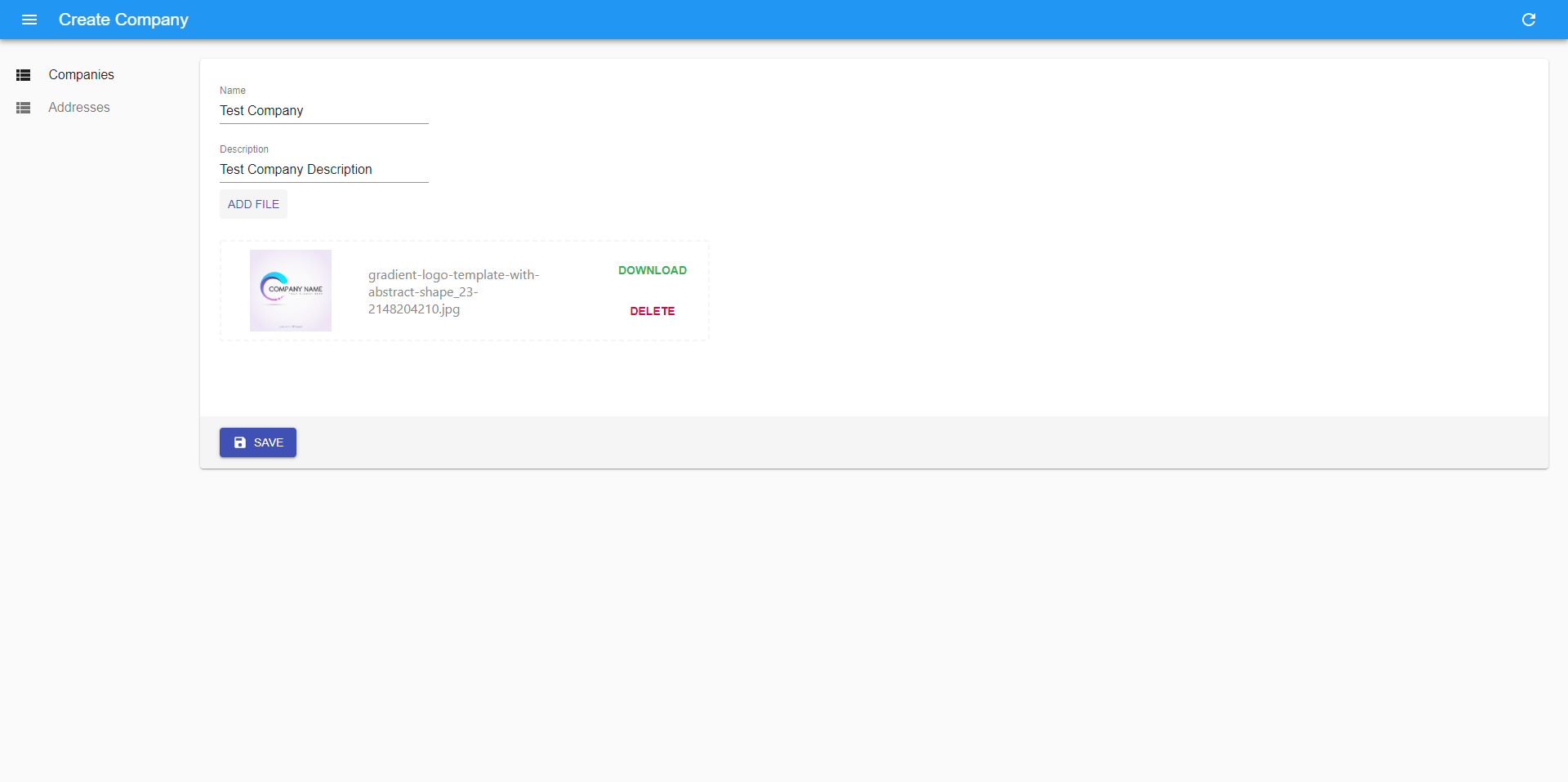
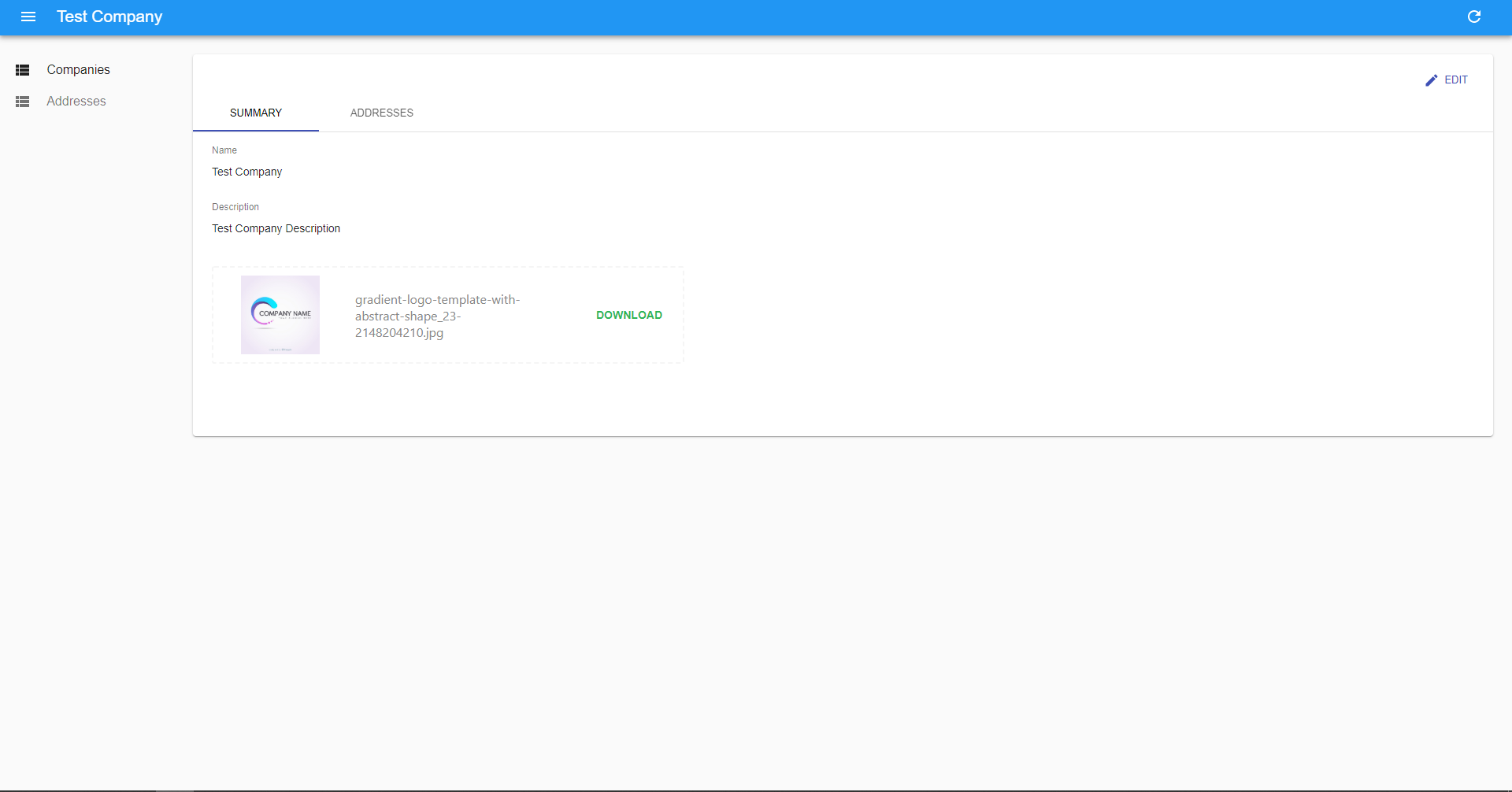
Let’s say we would like to add some photos to our company record. We will store them on Amazon S3. To handle it from the UI perspective, we created a custom React Admin input — https://github.com/FusionWorks/react-admin-s3-file-upload/. Here is how it should be added to our application:
To make this component work, we will need some support from the API side for signing AWS API requests. Let’s add the required components to our NestJS-based backend.
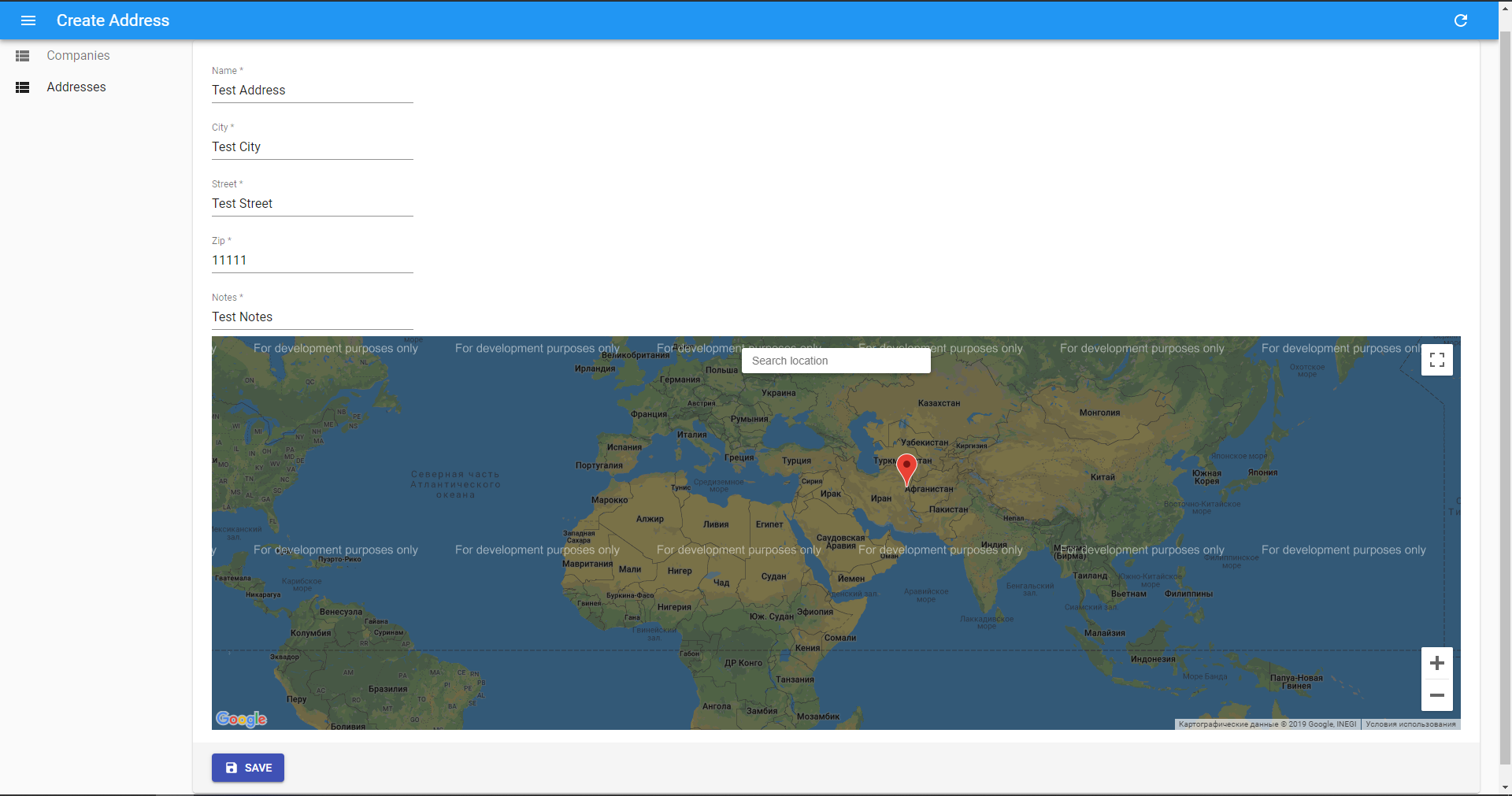
Sometimes we need to associate some location on the map with one of our entities. For this purpose, we created a Google Maps input —https://github.com/FusionWorks/react-admin-google-maps. To use it we will need to update our Address Entity. We will store the pointer on the map like a JSON object in the JSON column in our DB.
And run our frontend part with react-admin from “admin-ui” folder:
yarn start
Conclusion
In this article, we touched on the relationship between entities, but there are many more topics that have not been addressed but will be described in the future. I will cover them in the next articles and we’ll see if this stack survives nicely. So stay tuned to the FusionWorks: