Most traders make decisions somewhere between using a spreadsheet and their gut feeling. One is too slow to keep up with the market, the other is too expensive to be wrong about. When Allasso came to FusionWorks, they wanted to give financial professionals a third option: a workspace where a trade could be tested, stress-checked, and understood before any real money moved.
What you are about to read is less a portfolio piece and more a description of how we work. Allasso is the example, but the pattern is the point. We treat companies that hire us as long-term product partners, and the work below is what that looks like when it plays out over a couple of years.
Starting small, on purpose
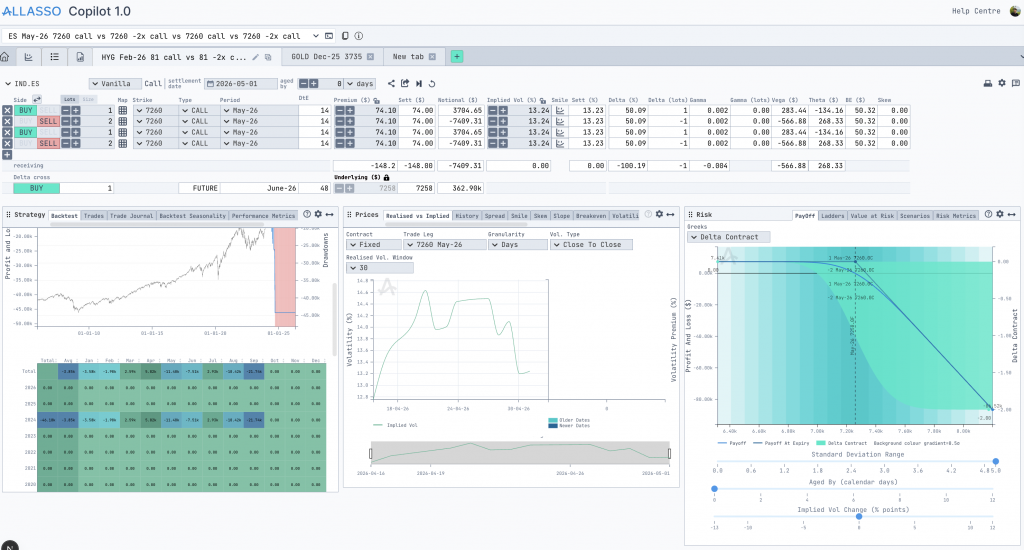
The first version of the product did exactly one thing: the trader picked a single instrument, for example, gold or the S&P 500, and ran “what if” scenarios against it. They could change the price, the volatility (the number traders watch to guess how wild the market is about to get), and the inputs that drive the market underneath, then watch the consequences update in seconds.
The work that used to live in a spreadsheet, calculated by hand and prone to small errors with large costs, now happened inside a tool built for the job. Assumptions could be tested instead of being guessed.
We could have proposed a much bigger first build but we didn’t. Because a smaller first version meant Allasso’s users could touch the product sooner and tell us what was actually missing. That early feedback is what shaped every decision after it.
Letting the product grow from real usage
As traders spent time inside the tool, they started asking for more context around each decision, so we built outward in layers rather than starting over. Historical charts came in to ground the scenarios in what the market had done. Risk analysis arrived next, then calculated outputs, followed by new ways to look at the same trade from different angles. Each addition wrapped around the existing workflow instead of replacing it, which meant nobody had to relearn a tool they already trusted.
This is the part of the partnership we care most about. It is easy to build the thing on the brief. It is harder, and more useful, to keep building in a direction that respects what users have already learned.
Knowing when to throw something away
The first version of the charts was built with a tool called Plotly. It got us moving fast, which was the right call at the time. But as traders pushed the product harder, they needed charts that behaved in very specific ways.
So we moved to D3, which gave us full control over how every chart looked and how every interaction behaved. That switch unlocked the visualizations we couldn’t have built before, and it set up everything that came after. Part of being a real partner is telling a client when it is time to replace something we built ourselves, and then doing the replacing without friction for the users.
Growing past the original scope
Over the last year, the product has grown well beyond the single-screen tool we started with. Together, we built two new modules that opened up entirely new ways of working.
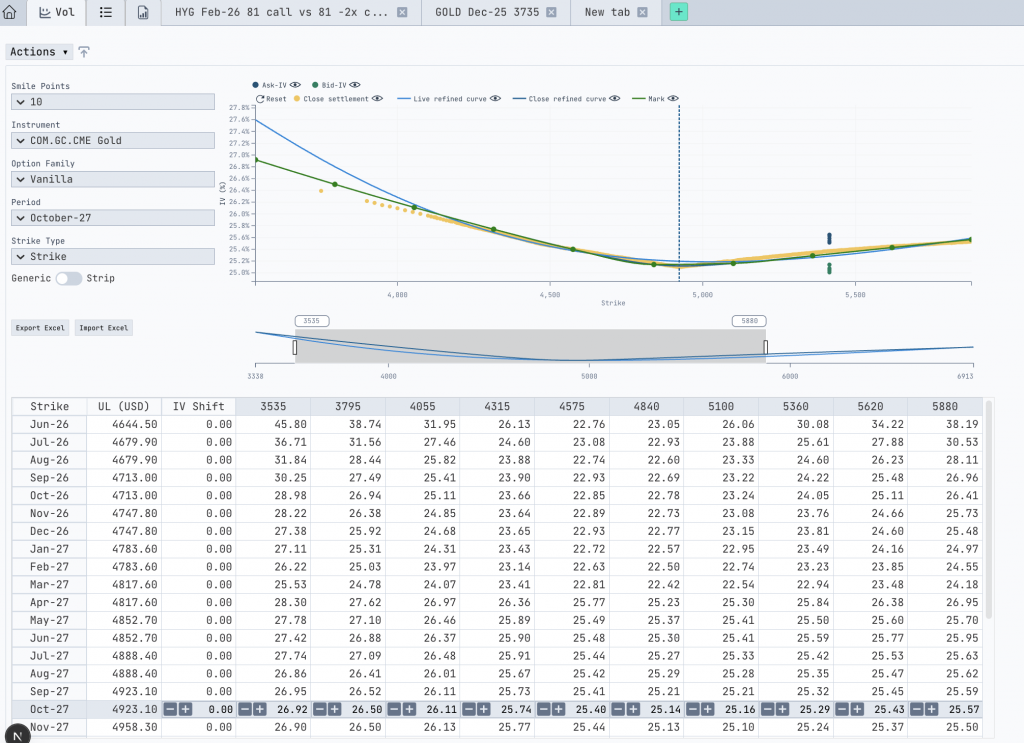
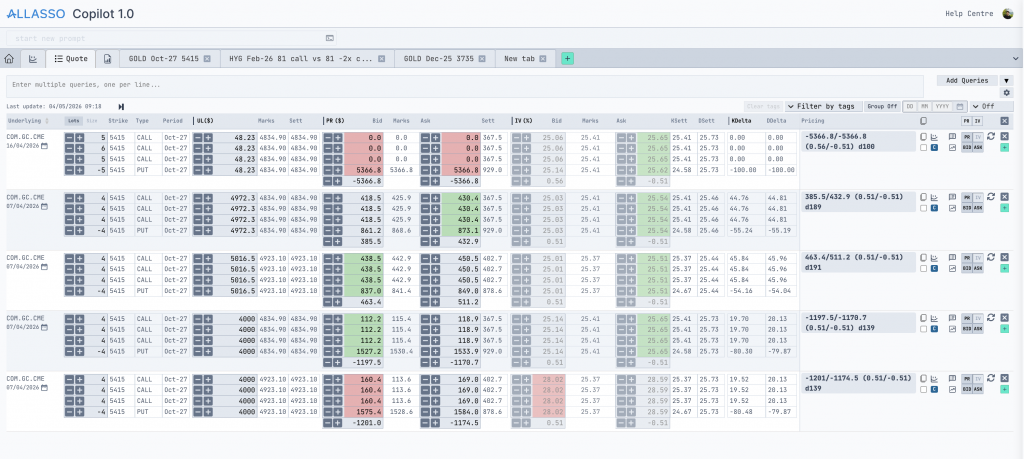
The first, Quotes, lets traders work with several instruments at once. They could compare positions side by side, edit quote structures, and recalculate multiple positions inside a single workflow instead of jumping between tabs. The second, Volatility, gave traders direct, visual control over volatility surfaces and smiles (the maps traders use to price options across different scenarios). They could adjust values by hand, publish the structures they built, and reuse those calculations elsewhere in the platform.
Around this point, something quietly important happened. The separate pieces of the product started talking to each other, and the workspace stopped feeling like a collection of features. It started feeling like one connected environment, which is exactly what a trading tool needs to be.
Meeting traders in their own language
Once the platform was mature, we kept noticing the same small friction – when a trader has an idea, they describe it in shorthand: the thing they want to trade, the period, a few numbers, whether they are betting on the price going up or down. Then they sit down at the screen and translate that shorthand, click by click, into a structure the system understands. The idea is fast. The data entry is slow.
So we built an AI-powered structure recognition directly into the application. A trader can type their idea the way they would say it out loud, naming the underlying (the asset the trade is based on, like gold or an index), the contract period, the strike prices (the price levels where the trade pays off), the quantities, the call and put legs (the individual up-bets and down-bets that make up the position), and the target price. The system reads that shorthand and turns it into a fully formed structure inside the app, ready to test.
The result is a workspace where structure creation is faster, manual input drops, and the tool finally meets traders where they already are, instead of asking them to translate themselves into it. This is the philosophy the whole partnership has run on: watch how the work happens, then shape the product around it.
What we are building next
Today, charts, quotes, volatility analysis, shared structures, exports, and trading calculations all live inside one connected ecosystem. FusionWorks is still building with Allasso, and the next phase is taking some of the individual chart and analytics components out into standalone libraries so they can run anywhere: JavaScript apps, Python notebooks, future trading products that have not been designed yet.
The product started as one instrument on one screen. It became a set of tools shaped around the way traders work – 100 features built across 700 tasks, because the team behind it kept pushing the boundaries and we kept showing up with the right solutions. That, more than any single feature, is what we mean when we say partnership.
FusionWorks is an AI-native software delivery company. Not AI-assisted. Not AI-curious. AI-native – meaning the entire delivery model is built around it.
This is a deliberate bet. While most companies bolt AI tools onto existing processes, we redesigned the process itself. Every workflow, every team structure, every quality gate is engineered for a world where AI writes a significant part of the code and humans provide the judgment, architecture, and standards that make it production-ready.
What AI-Native means in practice
Strong engineers, not cheap labour. When AI handles routine implementation, the value of an engineer shifts. We hire people who think well – who understand real customer problems, make architectural decisions, and iterate fast. Curiosity, judgment, and speed of learning matter more than typing speed.
Systems and workflows, not chaos. AI amplifies whatever you feed it. Feed it chaos, and you get faster chaos. Feed it a structured, factory-like process – with clear quality gates, defined architecture, and repeatable standards – and you get consistent, reliable output at speed. We chose the second option.
Smaller teams, faster cycles. The old agency model scaled by hiring. More people, more revenue, more coordination overhead. Our model scales differently: strong engineers + strong process + strong AI automation. Smaller teams move faster, deliver more, and maintain higher quality.
Architecture and judgment, not endless manual implementation. Human experts design the workflows, quality gates, architecture, and decisions. AI helps us deliver faster, with more consistency and less waste. This isn’t about replacing engineers — it’s about removing the parts of the job that didn’t require engineering in the first place.
Production-ready standards, not demo-level hype. Anyone can build something that looks real using AI. Then reality hits: authentication, payments, data migrations, CI/CD, security, performance. We bridge the gap between prototype and production — with the speed and cost-efficiency that AI-native delivery enables.
Why this matters for our clients
If you’re a founder who built an MVP in Lovable or Figma and needs it live in production – we take it there. If you’re an established company that needs a reliable engineering partner – we deliver with predictability, not just promises.
Our delivery runs on a clear structure: AI embedded in the actual workflow (not in a slide deck), clear scope per sprint, weekly demos, and production-ready standards from day one. Less dependency on random talent. More reliability with real engineers and a strong system.
The shift we’re making
Traditional outsourcing was never a great scalability story. Revenue grew with headcount. Margins stayed thin. Everything was people-dependent.
We’re building something different – a tech company with its own way to develop software. A factory-like process, engineered by humans, automated by AI. We own the process, the expertise, and the technology behind delivery. That’s how an outsourcing company becomes a real tech partner.
Better systems, not bigger teams. The future of software development is not bigger teams. It’s efficiency built with systems.
You built something real. You took an idea, opened Lovable, and turned it into a working product: a frontend, backend logic, a database, auth. It works and users are signing up. But now you’re starting to feel the friction.
Maybe Lovable went down and your app went with it. Maybe someone on your team pushed a change that broke something in production and there was no review process to catch it. Maybe you just want to know that your production environment is yours: stable, predictable, and under your control.
The good news: you don’t have to abandon Lovable to get there. You can keep building in Lovable while running a proper production environment alongside it. That’s exactly what we help founders do at FusionWorks, and this article walks you through how we approach it.
The Core Idea: Lovable for Development, Production on Your Terms
The migration most people imagine is an all-or-nothing move: rip everything out of Lovable, rewrite what you need, and never look back. That’s expensive, risky, and usually unnecessary, especially at the stage where you’re still iterating fast.
What we propose instead is a dual-environment setup:
Lovable stays your rapid prototyping and development tool. Founders and non-technical team members can keep making changes there.
A separate production environment runs on infrastructure you control – Cloudflare Pages for the frontend, Supabase’s own cloud for the backend and database.
GitHub sits in the middle, syncing changes from Lovable to production through pull requests and a proper review process.
This means you get the speed of Lovable and the stability of a controlled production deployment. Changes flow from Lovable through GitHub, get reviewed (by your team or ours), and only then reach your users.
What Lovable Is Actually Made Of
Before you can migrate anything, you need to understand what Lovable assembled for you under the hood.
Lovable uses Supabase as its backend layer. Your database, your Edge Functions, your authentication, it all lives in a Supabase project that Lovable manages on your behalf. The frontend is a standard SPA (Single Page Application) built with Vite and React, and Lovable handles the build and deployment for you.
When you connect Lovable to GitHub (which you should do immediately if you haven’t), you get a repository with two main areas: a src folder containing your frontend code and a supabase directory containing your Edge Functions code and database migrations.
That repository is your escape hatch. Everything you need to run independently is in there, with a few catches we’ll get to shortly.
The Migration Path: Step by Step
1. Audit Your Repository
Start by pulling down your Lovable-connected GitHub repo and actually reading through it. Pay special attention to two things:
Database migrations. Lovable generates these as you build, but the ordering isn’t always clean. We’ve encountered cases where a security policy for a table was created in a migration that ran before the migration that created the table itself. Go through the migration files in order and make sure each one only references objects that already exist at that point in the sequence. You may need to reorder or merge a couple of files.
The config.toml file in the supabase directory. This contains your Supabase project configuration: the project ID it’s linked to, which features are enabled, and importantly, the JWT verification settings for your Edge Functions. We’ll come back to this.
2. Set Up Your Production Infrastructure
We recommend the following stack for most Lovable migrations – it’s cost-effective, gives you full control, and each piece can be swapped independently later:
Supabase Cloud for your database, Edge Functions, and authentication. You’ll create a new Supabase project directly on supabase.com. This gives you access to features and configuration options that Lovable’s managed Supabase instance doesn’t expose.
Cloudflare Pages for your frontend. The free tier is generous and more than sufficient for most early-stage products. It gives you global CDN, automatic builds from GitHub, and preview deployments for every branch.
The key benefit of this split: each piece runs on infrastructure optimized for its purpose, and you’re not locked into any single vendor.
3. Navigate the Supabase Gotchas
This is where real-world experience saves you hours of debugging. Here are the issues we’ve hit and solved:
API key types. Supabase has different types of API keys, and Lovable may have been using legacy keys. Before you update your codebase to use the new project’s keys, check which type Lovable was using and make sure you match it or deliberately migrate to the newer format.
JWT verification on Edge Functions. By default, Supabase Cloud enables JWT verification on all Edge Functions. Lovable typically disables it. If you deploy your functions and immediately start getting 401 Unauthorized errors even though your keys are correct, this is almost certainly the cause. Check that your config.toml has verify_jwt = false under each function definition or better yet, take this opportunity to properly implement JWT verification.
Data API settings. The inverse problem: Lovable enables the Data API by default, but a fresh Supabase project has it disabled. If your Edge Functions are calling Supabase’s REST API internally, you’ll need to flip this on.
4. Deploy Your Frontend to Cloudflare Pages
Connect your GitHub repository to Cloudflare Pages and set up a build. A few things to watch for:
The lockfile problem. Cloudflare’s default build tool is Bun, and if there’s a bun.lock or bun.lockb file in your repo (Lovable may have created one), Cloudflare will use Bun regardless of what you want. If your project was built with npm, delete the Bun lockfile from your repo. This avoids subtle dependency resolution differences that can cause build failures.
SPA routing. This one bites everyone. Lovable handles SPA routing internally and doesn’t export any routing configuration to your repo. When you deploy to Cloudflare Pages, navigating directly to any route other than / will give you a 404. You need to configure Cloudflare to serve your index.html for all routes. The simplest approach: add a _redirects file to your public folder with /* /index.html 200.
Branch configuration. Since we’re maintaining backward compatibility with Lovable, we recommend creating a dedicated branch for your production deployment (e.g., production). Configure Cloudflare Pages to build from this branch. Changes from Lovable flow into main, get reviewed, and are merged to production when ready.
Domain and auth settings. Once your Cloudflare deployment is live (either on a custom domain or the preview URL), go back to your Supabase project and update the URL Configuration in Authentication settings. Without this, OAuth flows and email links will point to the wrong place.
5. Handle the Lovable AI Dependency
This one catches people off guard. If your app uses any AI features – chatbots, summaries, document Q&A, sentiment analysis, image understanding – Lovable provides those through its own AI proxy called Lovable AI. It gives your app access to models like Gemini, GPT-5, and others without requiring you to set up API keys or billing with providers directly. It just works inside Lovable.
The problem is that Lovable doesn’t expose this API for use outside their platform. Once your app is running on your own infrastructure, any feature that calls Lovable AI will simply stop working.
You have a few options here, and which one you pick depends on how you want to manage the transition:
Option A: Replace with OpenRouter. This is our recommended approach for most cases. OpenRouter gives you a single API that routes to dozens of LLM providers: Anthropic, Google, OpenAI, and more. You swap out the Lovable AI calls for OpenRouter calls, keep one API key, one billing account, and you can switch between models without changing your code. It’s the closest equivalent to what Lovable AI was doing for you.
Option B: Go direct to providers. If you know exactly which model you need (say, Claude for your chatbot, Gemini for image analysis), you can integrate with each provider’s API directly. More control, but more API keys and billing relationships to manage.
Option C: Make it configurable. This is the approach we often take when founders want to keep building in Lovable while running production separately. You abstract the AI call behind a configuration flag – in the Lovable development environment, it uses Lovable AI; in production, it routes through OpenRouter or a direct provider API. Same codebase, different backends depending on where it’s running. This preserves full backward compatibility with Lovable while giving production its own reliable AI layer.
Whichever route you choose, the code changes are usually straightforward, Lovable AI calls follow a standard pattern, and replacing them with an OpenRouter or direct API call is mostly a matter of swapping the endpoint and adding an API key from environment variables.
6. Establish the Sync Workflow
This is where the real value of our approach becomes clear. Here’s how the day-to-day workflow looks:
Founders and team members build in Lovable as they always have. Lovable pushes changes to the main branch on GitHub.
A pull request is created from main to production (this can be automated).
The PR gets reviewed, either by your team or by FusionWorks engineers. This is the quality gate. We check for breaking changes, security issues, and anything that shouldn’t go to production without testing.
Once approved, changes merge to production and Cloudflare automatically builds and deploys.
Professional development work (bug fixes, performance improvements, features that need proper engineering) happens on feature branches, goes through its own PR process, and merges to production independently.
This gives you the best of both worlds: Lovable’s speed for rapid iteration and a professional engineering workflow for production stability.
Why This Matters
We’ve seen it too many times: a founder builds something great in Lovable, gets real users, and then hits a wall. Lovable has an outage and their product goes down. An accidental change breaks something critical. There’s no staging environment, no review process, no way to roll back.
Going from a working prototype to a production-grade setup doesn’t have to mean a complete rewrite. It means putting the right infrastructure and processes around what you’ve already built.
At FusionWorks, we’ve been building production software for over a decade. We know how to take what you’ve created in Lovable, which is real, working code, and give it the production foundation it deserves. And we do it in a way that lets you keep moving fast in Lovable while your production environment stays rock solid.
FusionWorks helps founders migrate from AI-powered platforms to production-grade environments. If you’ve built something in Lovable and you’re ready for production stability without slowing down, get in touch.
Software projects often fail in boring ways, because of unclear process, inconsistent quality, or weak data handling. That’s exactly what ISO standards are designed to prevent, especially in the AI era.
We are certified for the latest versions of:
ISO/IEC 27001 — information security management
ISO 9001 — quality management
These certifications were issued after an independent audit by TÜV AUSTRIA. So this isn’t “trust us” marketing. It’s an externally checked system that we run every day.
So why should you care about this?
What you get as a client (from lower risk to easier compliance)
First of all, lower risk for your data and your business
If your product handles customer data, payments, internal business logic, or anything sensitive, you don’t want improvisation. We assess risks, protect assets, and use clear rules for handling sensitive and personal data. Security covers also delivery, IT operations, and the people/process side too. Even the physical side matters: access control, networks, and basic office security are part of the system.
More predictable delivery (less hero work)
Many teams can build features, but fewer can deliver consistently when things get messy, like scope changes, urgent fixes, new people joining, shifting priorities and so on.
ISO 9001 pushes discipline into the boring parts that decide outcomes:
Clear, repeatable delivery process
Quality checks built into the workflow (not “we’ll test later”)
Continuous improvement instead of repeating the same mistakes
Faster vendor approval and easier compliance
If you’re in a company that takes security seriously (or must — finance, healthcare, SaaS with enterprise clients), you know the pain: questionnaires, audits, procurement checks.
ISO certification makes the conversation easier because we already have the system and evidence in place. You spend less time “evaluating the vendor” and more time shipping the product.
Why this matters when choosing a development partner
Most competitors will say: “We care about quality” and “We take security seriously.”
ISO is the difference between a claim and a mechanism.
It means we don’t rely on luck, individual habits, or a single “strong PM” to keep things under control. The company is built to deliver reliably — even as the team scales, people rotate, and the product evolves.
As a result, your data is handled with a real security system, your delivery becomes more predictable and your vendor risk goes down — which matters a lot when stakes go up.
If you want a team that ships fast and operates like a long-term partner — let’s talk.
For more than a decade, FusionWorks has mostly preferred time-and-materials projects. Not because we didn’t like fixed prices, but because they rarely worked in the real world of modern software development.
In Agile, nobody writes 200-page “waterfall” specifications anymore. Requirements evolve. Users learn what they actually need only when they finally see the first version. And every small change, even a reasonable one, requires human time. But human time is slow and expensive.
So, historically, fixed-price meant one of two things:
You load the project with a massive risk buffer, which nobody likes.
You accept the risk and pray that the requirements won’t shift too much, which they always do.
And that’s why, even when clients pushed for fixed prices, we were careful, conservative, and preferred T&M. We wanted to always deliver what the client really needed, not just what’s written in the document.
Then something fundamentally changed.
AI Changed the Equation
With angen.ai and our internal “AI-at-every-stage” development pipeline, the nature of change transformed itself.
The real cost of change has never been the conversation. It’s not about writing a sentence like “add a filter here” or “extend this workflow.” The real cost was always in the coding.
Developers needed a day or two (sometimes a week) to rewrite pieces of the system. And multiplied by any European rate, this becomes real money, which is exactly why fixed-price budgets used to be so fragile.
AI broke that bottleneck. Today, our teams can:
regenerate modules in hours, not days
rewrite architecture-consistent code in bulk
apply change requests extremely fast
keep code quality, patterns, and standards intact
maintain predictable velocity because AI removes human bottlenecks.
We suddenly have more “budget room” inside the same fixed price.
If earlier 80–90% of the budget was spent on pure coding effort, now AI reduces that dramatically. That free space can absorb many of the natural requirement shifts that happen during a real project without blowing up the budget, team morale, or delivery timeline.
Fixed Price Becomes Fair Again
This new reality allows us to offer fixed-price projects in a way that feels healthy for both sides.
For clients
predictable budget
less fear of the classic “change request” stress
faster delivery
more flexibility during development
same quality, but multiplied by AI speed.
For us
less risk
more consistency
less time wasted on manual coding
more space to handle changes within the planned scope
a clear, reliable delivery pipeline powered by angen.ai.
We are no longer afraid that a small product correction will cost two weeks of human time. Now it’s usually a couple of hours of AI-assisted regeneration plus human supervision.
A New Era for Our Delivery Model
So yes, for the first time in many years, we at FusionWorks become genuinely open to fixed-price projects again. Because our capabilities changed.
AI makes software development faster, more predictable, and more resilient to changes. And when the coding bottleneck shrinks, the whole fixed-price model becomes much more practical and much more fair.
The automation landscape may be experiencing a fundamental shift as Model Context Protocol (MCP), Anthropic’s open standard for AI-tool integration, emerges to challenge traditional workflow platforms like n8n. While n8n has dominated with its visual, deterministic approach to connecting apps and services, MCP may revolutionize automation by putting artificial intelligence at the center of workflow orchestration, allowing agents to reason through complex processes and dynamically select tools rather than following pre-programmed sequences. This raises a compelling question: as AI agents become more capable of adapting workflows in real-time based on context and changing requirements, we may no longer need the rigid, pre-built workflows that have defined automation for years. However, the answer may not be straightforward—while MCP may introduce groundbreaking capabilities for intelligent, context-aware automation, n8n and similar platforms may still excel in areas where predictability, event-driven triggers, and user-friendly visual design matter most. To understand whether MCP truly represents the future of automation or simply offers a complementary approach, we need to examine how these technologies differ in their core architecture, workflow building paradigms, and real-world applications.
Core Purpose and Architecture
Model Context Protocol (MCP)
Purpose: MCP is an open standard (introduced by Anthropic) designed to bridge AI models with external data sources and tools. It acts like a “universal adapter” for AI, allowing large language models (LLMs) to invoke external functions, query data, or use services in a consistent way. The goal is to eliminate custom one-off integrations by providing a single protocol through which AI systems can access many capabilities, much as USB or LSP (Language Server Protocol) standardized hardware and language support.
Architecture: MCP uses a client–server model over JSON-RPC 2.0. An AI-driven application (the host) runs an MCP client, and each external resource (database, API, file system, etc.) runs an MCP server. The servers expose capabilities in three forms: Tools (functions the model can execute), Resources (data or context it can retrieve), and Prompts (predefined templates or workflows). When the AI model needs something, it sends a structured JSON-RPC request via the MCP client to the appropriate server, which performs the action and returns results. This handshake ensures the AI’s requests and the tools’ responses follow a unified schema. Importantly, MCP is stateful – maintaining context across a session – so the AI and tools can engage in multi-step interactions with memory of prior steps. Security and consent are built-in principles (e.g. requiring user approval for tool use and data access) given the powerful actions tools can perform. In summary, MCP’s architecture externalizes functionality into modular “plug-and-play” servers, letting AI agents mix and match tools without hard-coding each integration.
n8n
Purpose: n8n is a general-purpose, open-source workflow automation platform. Its core aim is to let users connect different applications and services to automate tasks without heavy coding. In practice, n8n provides a visual workflow editor where you drag and drop nodes representing integrations or logic, chaining them to design processes (similar in spirit to tools like Zapier or Make). It’s built to handle routine automation – the classic “when this happens, do that” scenarios – for personal projects up to complex business workflows. Because it’s open-source, users can self-host and extend it, making it popular for those needing flexibility beyond what closed SaaS automation tools offer.
Architecture: Under the hood, n8n follows a node-based pipeline architecture. The front-end Editor allows users to create a workflow, which is essentially stored as a JSON definition of connected nodes. The back-end Workflow Execution Engine then interprets this and runs the flow step by step. Workflows typically start with a Trigger node that kicks off the process (e.g. an incoming webhook, a cron timer, or an event from an app). After triggering, the engine executes a sequence of Regular nodes, each performing a specific action: fetching or transforming data, calling a third-party API, sending an email, etc.. Data outputs from one node are passed as inputs to the next, allowing chaining of operations. n8n uses a database (SQLite by default) to store workflow definitions, credentials, and execution logs. A REST API is also available for programmatic control of workflows (e.g. triggering executions or managing flows). In essence, n8n’s architecture is that of a visual orchestrator: a UI-driven design tool coupled with a workflow engine that executes predefined logic across integrated apps.
Workflow Building and Management
Building Workflows with MCP
MCP does not provide a traditional visual workflow designer – instead, it enables workflows to be constructed dynamically by AI agents. Here, the “workflow” is a sequence of tool calls planned at runtime by an AI model. Developers assemble the building blocks by connecting MCP servers (for the data sources/tools they need) to an AI agent. The LLM then has the flexibility to decide which tools to use and in what order to achieve a goal, based on the user’s request or its prompt. This means workflow logic in MCP is emergent and context-driven rather than explicitly drawn out. For example, an AI agent using MCP could autonomously perform a multi-step task like: query a CRM for client data, then send a formatted email via a communications API, then log the interaction in a database – all in one chain of actions it devises. The MCP spec even allows servers to provide Prompt templates or scripted sequences (like a predefined mini-workflow) that the AI can follow, but the key point is that the agent orchestrates the flow. Managing workflows in MCP is therefore more about managing the context and permissions for the AI (ensuring it has the right tools and constraints) rather than manually mapping out each step. This affords tremendous flexibility – the agent can adapt if conditions change – but it shifts responsibility to the AI to plan correctly. Developers using MCP will often write code to supervise or constrain the agent’s planning (for safety), but they do not have to hardcode each step. Overall, MCP enables a more adaptive, AI-driven workflow management approach: you specify the capabilities available and the objective, and the model handles the procedural logic on the fly.
Building Workflows with n8n
In n8n, building and managing workflows is an explicit, user-driven process. Using the n8n editor, you create a workflow by placing nodes and drawing connections to determine the exact flow of data and actions. Each workflow typically starts with a Trigger node (e.g. a timer, a webhook endpoint, or an event like “new record in database”) which spawns an execution whenever the trigger condition occurs. From there, you chain action nodes in the desired order. n8n’s interface lets you branch logic (for example, adding an IF node to handle conditional paths), merge data from multiple sources, loop through items, and even include human-in-the-loop approvals if needed. All these control structures are configured visually, which makes the flow of the process very transparent. Workflow management in n8n involves versioning or updating these node configurations, handling credentials for each integration, and monitoring execution logs. Because the workflows are deterministic, testing and debugging them is straightforward – you can run a workflow step-by-step and inspect each node’s output. n8n also supports organizing workflows into separate files or triggering one workflow from another, which helps manage complexity for large processes. In summary, n8n offers a structured and predictable workflow-building experience: you design the blueprint of every step ahead of time. This gives you fine-grained control and reliability (the workflow will do exactly what you configured), but it means the automation will only handle scenarios you explicitly accounted for. Changes in requirements usually mean adjusting the workflow or adding new nodes. This rigidness is a trade-off for clarity and safety – especially valuable in environments where you need auditability or strict business rules. Essentially, n8n’s workflows are managed by people (or by static logic), whereas MCP workflows are managed by an AI in real-time.
Integrations, Triggers, and Third-Party API Support
Integrations & Triggers in MCP
MCP’s approach to integrations is to define a standard interface so that any tool or service can be plugged in as a module, as long as it has an MCP server. This has led to a rapidly growing ecosystem of MCP servers exposing popular services: early adopters have built MCP connectors for Google Drive, Slack, GitHub, various SQL databases, cloud storage, and more. In theory, this means an AI agent that speaks MCP can instantly gain new abilities by connecting a new server URL – “one interface, many systems”. Major tech companies have noticed this potential: Google, Microsoft, OpenAI, Zapier, Replit and others publicly announced plans to support MCP, indicating that a wide array of third-party APIs will become accessible through the protocol. Notably, Zapier’s planned MCP support could expose thousands of SaaS app actions to MCP clients, essentially bridging traditional APIs into the AI agent world. However, triggering workflows in an MCP paradigm works differently. MCP by itself doesn’t have event listeners or schedulers as a built-in concept – it’s usually the AI application that initiates an MCP session (often prompted by a user request or some programmed schedule in the host app). For example, rather than “watching” for a new email to arrive (as n8n might with a trigger node), an MCP-enabled agent might be invoked after an email arrives (by surrounding application logic), and then the agent could use an email-reading tool via MCP to process it. Some MCP servers could simulate triggers by allowing the server to push events (the MCP spec allows server-initiated messages in the form of sampling requests), but this is emerging and not as straightforward as n8n’s event triggers. In practice today, MCP excels at on-demand integrations – the agent pulls whatever data it needs when instructed. If you need time-based or event-based kicks, you’d likely integrate MCP with an external scheduler or use a hybrid approach (e.g. use n8n or cron to trigger an AI agent periodically). So, while MCP dramatically simplifies connecting to third-party APIs (one standardized JSON structure instead of many disparate API formats), it is less focused on the event source side. You get integration uniformity and the power for an AI to call many APIs, but you don’t yet get a rich library of pre-built event triggers out-of-the-box in the same way as n8n’s nodes.
Integrations & Triggers in n8n
n8n was built with integrations at its core, and it comes with hundreds of pre-built connectors for popular apps and services. These range from databases (MySQL, PostgreSQL) to SaaS platforms (Salesforce, Google Sheets, Slack), developer tools (GitHub, AWS), and utilities (HTTP request, JSON transformation, etc.). Each integration node in n8n knows how to auth to the service and perform common actions or listen for events. For example, n8n has nodes for things like “Google Sheets: Append Row” or “Salesforce: Update Record” – which wrap the API calls in a user-friendly form. This extensive library means you often can integrate a third-party system by simply adding the appropriate node and configuring a few fields, without writing any code. Moreover, n8n supports generic webhooks and API calls, so if a specific service isn’t covered by a dedicated node, you can use the HTTP Request node or a Webhook trigger to connect it manually.
A major strength of n8n is its Trigger nodes that can respond to external events. For instance, you can have a workflow start whenever a new issue is created in GitHub, or when an incoming webhook is received (which you could tie to any service capable of sending HTTP callbacks)tuanla.vn. There are also timers (Cron-like scheduling) to run workflows periodically. This event-driven capability lets n8n act as a listener in your architecture, continually watching for conditions and then reacting. In contrast to MCP’s on-demand nature, n8n’s triggers make it straightforward to build automations that fire automatically on new data or time-based conditions. Once triggered, the workflow can call various third-party APIs in sequence using the action nodes. Each node typically corresponds to a specific API endpoint or operation (send email, read DB record, etc.), including handling authentication and error responses.
In terms of third-party API support, n8n’s breadth is very high – not as vast as something like Zapier’s library, but definitely covering most common services needed for business workflows. If an integration is missing, the community nodes ecosystem or custom node development can fill the gap (developers can create new integration nodes in JavaScript/TypeScript). In short, n8n shines at integration and trigger support for traditional automation: it can catch events from many sources and orchestrate API calls reliably. The trade-off is that each integration is a predefined piece; adding a brand-new or very custom integration might require writing a new node plugin. But once that node (or a workaround via HTTP request) is in place, it slots into the visual workflow like any other.
Extensibility and Developer Friendliness
Extensibility of MCP
MCP is fundamentally a developer-oriented standard – its extensibility comes from being open and language-agnostic. There are official MCP SDKs in multiple languages (Python, TypeScript, Java, C#, Swift, etc.) to help developers create MCP clients or servers. This means if you have a custom system or a niche tool not yet in the MCP ecosystem, you can build an MCP server for it and immediately make it accessible to any MCP-compatible AI app. Because MCP defines clear schemas for tool descriptions and data exchange, you avoid writing boilerplate glue for every new integration. Developers have likened MCP to a “universal connector” – once your service speaks MCP, any AI agent that supports MCP can use it without further adaptation. This modularity is a big plus for extensibility: teams can independently create MCP servers for their domain (e.g., a finance team makes an MCP server for an internal accounting database, a DevOps team makes one for their monitoring tools) and a central AI agent could leverage all of them.
From a developer-friendliness perspective, MCP’s learning curve is moderate. You do need programming skills to implement or deploy servers and to integrate an MCP client into your AI application. However, it significantly reduces the integration burden compared to custom-coding each API. As one analysis noted, without MCP an AI agent might need “thousands of lines of custom glue code” to wire up multiple tools, whereas with MCP a mini-agent framework can be built in a few dozen lines, simply by registering standard context and tools. This standardized approach accelerates development and experimentation – developers can swap out tools or models without refactoring the entire system. Another aspect of MCP’s developer friendliness is the community support and momentum: because it’s new and open, many early adopters share open-source MCP servers and best practices. There are directories of ready-made MCP servers (e.g. mcp.so or Glama’s repository of open-source servers) that developers can pick up and run, which lowers the barrier to trying MCP out. On the flip side, being a bleeding-edge technology, MCP is still evolving – so developers must be comfortable with some instability. The spec might update frequently, and certain features (especially around authentication, networking, etc.) are still maturing. In summary, MCP is highly extensible by design and friendly to developers who want a clean, uniform way to expose or consume new capabilities. It trades a need for upfront coding and understanding of the protocol for long-term flexibility and less bespoke code overall. For teams aiming to build complex AI-driven systems, this trade-off is often worthwhile, but it’s not a point-and-click solution – it demands software engineering effort and careful consideration of AI behavior.
Extensibility of n8n
n8n offers extensibility in a more traditional sense: since it’s open source, developers can create custom nodes and even modify the core. If a required integration or function is not available out-of-the-box, one can develop a new node module (in JavaScript/TypeScript) following n8n’s node API. The n8n documentation and community provide guidance for this, and numerous community-contributed nodes exist for specialized services. This allows n8n’s capabilities to grow beyond what the core team provides – for example, if you need to integrate with a brand-new SaaS API, you could write a node for it and share it with the community. The process involves defining the node’s properties (credentials, inputs/outputs) and coding the execute logic (usually calling an external API or running some code). While this requires programming, it’s a familiar pattern (similar to writing a small script) and you benefit from n8n’s existing framework (for handling credentials securely, passing data between nodes, etc.).
For developers, n8n is also friendly in terms of embedding and control. Its REST API allows integration into larger systems – for instance, a developer can programmatically create or update workflows via API, trigger them, or fetch their results. This means n8n can serve as an automation microservice within a bigger application, which is a flexible way to incorporate workflow logic without reinventing that wheel. Additionally, because n8n workflows are just JSON, they can be version-controlled, generated, or templatized by developers as needed.
However, one of n8n’s strengths is that you often don’t need a developer at all for many tasks – power users or non-engineers can configure quite complex workflows via the UI. This makes it broadly friendly: developers appreciate the ability to extend and script things when necessary, while less technical users appreciate the no-code interface for routine automations. In terms of extensibility limits: n8n, being a central orchestrator, means the complexity of logic and integrations grows within that single system. Very large-scale or highly dynamic scenarios might become unwieldy to manage as pure n8n workflows (you might end up with dozens of nodes and complicated logic – at which point a coding approach could be clearer). But for a huge class of problems – especially connecting known systems in repeatable ways – n8n’s approach is extremely productive.
In summary, n8n is extensible through customization (write new nodes or use the code node to execute arbitrary JavaScript) and developer-friendly in integration (API, self-hosting). It’s not trying to be a development platform for general AI or logic, but it provides just enough programmability to cover those edge cases that the visual interface can’t handle. Compared to MCP, one could say n8n is more user-friendly (for building fixed workflows) whereas MCP is more developer-friendly for building adaptive AI integrations. Each requires a different skill set: n8n favors workflow design skills and understanding of business logic, while MCP requires software development and AI prompt engineering skills.
Use Cases: Where MCP Shines vs Where n8n Shines
Because MCP and n8n take such different approaches, they tend to excel in different scenarios. Below we outline use cases or scenarios highlighting where MCP could outperform n8n and vice versa, along with any limitations:
AI-Driven, Unstructured Tasks (MCP Advantage): If your use case involves answering complex questions or performing ad-hoc multi-step tasks based on natural language instructions, MCP is a clear winner. An MCP-enabled AI agent can interpret a user’s request and dynamically decide a sequence of actions to fulfill it. For example, a user could ask an AI assistant “Organize a meeting with the last client I emailed and prepare a brief,” and the agent could fetch the client’s contact from a CRM, draft an email, schedule a calendar event, and summarize recent communications – all by orchestrating different tools via MCP. Such fluid, on-the-fly workflows are hard for n8n, which would require a pre-built workflow for each possible request. MCP shines when the problem requires reasoning or context-dependent steps: the AI can plan (and even deviate) as needed. This makes MCP ideal for autonomous agents or creative problem-solving scenarios (e.g. an AI writing code using an IDE plugin, researching and compiling a report from various sources, etc.), where the exact workflow can’t be fully anticipated in advance. That said, using MCP in this way also requires trust in the AI’s decisions – without guardrails, the agent might do irrelevant or inefficient actions, so it’s best used when you want the AI to explore solutions somewhat freely.
Complex Integrations with Changing Requirements (MCP Advantage): MCP’s standardized interface means it’s easy to plug in new integrations or swap components. In enterprise settings where the set of tools or APIs in use is frequently evolving, an MCP-based system could adapt faster. Instead of redesigning workflows, you’d register a new MCP server or update its capabilities, and the AI agent can immediately use it. This is powerful for composable architectures – e.g., if you start pulling data from a new database, you just add the MCP server for it, and the AI can incorporate that data into its tasks (assuming it’s been instructed properly). In n8n, by contrast, every new integration or change in process usually means editing the workflow or adding new nodes by hand. MCP could outperform n8n in development speed when integrating many disparate systems: developers spend less time on plumbing and more on high-level logic. Real-world adoption reflects this advantage; early users report significantly reduced boilerplate when adding new tools via MCP. The flip side is that MCP currently lacks the mature library of ready-made connectors that n8n has – you might have to implement or deploy those MCP servers – but the effort is once per tool for all agents, rather than per workflow.
Autonomous Agents and AI-Oriented Workflows (MCP Advantage): Some scenarios envision an AI agent operating continuously and making decisions (with occasional human feedback). MCP was built for this “agentic” mode. For instance, consider an AI customer service agent that monitors a support inbox and not only responds to queries but also takes actions like creating tickets, querying order databases, and escalating issues. With MCP, the AI can handle the entire loop: read email content, use a CRM tool to lookup orders, use a ticketing tool to log a case, compose a reply, etc., all by itself. n8n alone cannot achieve this level of autonomy – it could automate parts (like detecting an email and forwarding details), but it doesn’t reason or adapt; it would need an explicit workflow for each possible resolution path. Use cases in which conversational AI meets action (ChatGPT Plugins-style behavior, but more standardized) are where MCP shines. It essentially turns the AI from a passive responder into an active agent that can perceive and act on external systems. This could transform workflows like IT assistants, personal digital assistants, or complex decision support systems. The limitation here is ensuring the AI remains reliable and safe – businesses will impose constraints (e.g., require approvals for certain actions) because an error by an autonomous agent can have real consequences. This is why in practice, fully autonomous agents are rolled out cautiously. But MCP provides the needed plumbing for those who want to push towards that frontier.
Routine, Deterministic Workflows (n8n Advantage): For many classic automation tasks, n8n is the more straightforward and reliable choice. If you know the exact steps that need to happen (and they don’t involve complex reasoning), designing an n8n workflow is often quicker and safer than letting an AI figure it out via MCP. For example, “Every night at 1 AM, extract data from System A, transform it, and upload to System B” – this is n8n’s bread and butter. It has a Cron trigger for the schedule, connectors for both systems, and a visual flow you can test and trust. There’s no ambiguity in what will happen, which is crucial for compliance, auditing, and predictability. In sectors like finance or healthcare, there’s understandable hesitation to allow an AI free reign; instead, organizations lean on fixed workflows with human oversight. n8n excels in these scenarios by providing a clear map of actions with no surprises. Even when n8n incorporates AI (e.g. calling OpenAI for an NLP task), it’s done as a step within a controlled sequence. So for scheduled jobs, data pipelines, ETL, notifications, backups, and straightforward “if X then Y” automations, n8n will usually be more efficient. It executes faster (no large language model in the loop for decision-making), and it’s easier to troubleshoot if something goes wrong, because each step is predefined.
Event-Driven and Real-time Reactive Scenarios (n8n Advantage): When the requirement is “trigger an action immediately when X happens,” n8n’s architecture is a natural fit. For instance, a webhook can trigger a workflow the moment a form is submitted on a website, or a new lead in Salesforce can directly initiate a series of follow-up tasks. n8n’s built-in triggers and push connections mean minimal latency and complexity for such reactive flows. Achieving the same with an MCP-based system might involve bolting on an event listener that then invokes an AI agent – effectively adding more moving parts (and potentially an AI call that isn’t really needed just to route data). If no “thinking” is required – say, we just want to automatically copy an attachment from an email to Dropbox – n8n can do it entirely without AI, hence faster and with no model API costs. Third-party integrations that require waiting for incoming events (webhooks, message queues, etc.) are first-class citizens in n8n, whereas MCP setups would typically poll or rely on some custom bridging code. In short, for real-time integrations and straightforward data flows, n8n’s purpose-built automation framework is hard to beat in efficiency.
User-Friendly Process Automation (n8n Advantage): If the people setting up the workflow are business analysts or IT ops folks rather than developers or ML engineers, n8n is much more approachable. The low-code/no-code nature of n8n means a wider audience can self-serve their integration needs. For example, a marketing manager could create an n8n workflow to auto-collect survey results and send a summary email, using drop-down menus and form fields in n8n’s UI. That same task with MCP would demand a developer to script an AI agent (even if using MCP saved coding on the integrations, the setup and prompt design are code-centric). So, in environments where ease of use and quick iteration by non-developers is important, n8n has the clear advantage. Additionally, n8n provides logging and a visual trace of each execution, which makes maintenance simpler for ops teams. One can see what data went through each node, whereas an AI agent might require additional logging to understand why it took a certain action. The transparency of workflows is a big plus for n8n when handing off solutions to less technical stakeholders.
Complementarities and Outlook: It’s not necessarily an either–or choice between MCP and n8n; in fact, they can complement each other in powerful ways. We’re already seeing signs of convergence: for example, the n8n community has explored making n8n act as an MCP server, meaning any n8n workflow or node could be invoked by an AI agent as a tool. This essentially exposes n8n’s vast library of integrations to the MCP ecosystem – an AI could ask n8n (via MCP) to execute a specific pre-built action or even run an entire workflow. Conversely, n8n can also consume MCP services: instead of building a custom integration node from scratch, n8n could call an MCP server to leverage someone else’s integration. This hints at a future where MCP provides the standard interface layer, and n8n provides a robust automation engine and UI on top of it. In such a model, MCP and n8n would be less competitors and more like layers of the stack (AI reasoning layer and workflow execution layer, respectively).
At present, MCP cannot fully replace n8n for general workflow automation – especially for purely deterministic or event-driven tasks – and n8n cannot replace MCP’s ability to let AI intelligently operate across systems. MCP is a young technology (the standard is still evolving and not yet ubiquitous), whereas n8n is a stable workflow platform with a proven track record. Each has limitations: MCP’s current challenges include security/authentication maturity and the unpredictability of AI decisions, while n8n’s limitations include the effort to update flows for new scenarios and the inability to handle tasks it wasn’t explicitly programmed for. Many real-world solutions may combine them: using n8n to handle reliable scheduling and error-checking, and calling an MCP-driven AI agent for the parts of the process that require flexibility or complex decision-making.
In conclusion, MCP and n8n serve different core needs – MCP injects “brains” (AI context and reasoning) into integrations, while n8n provides the “brawn” (robust execution of defined workflows). MCP could outperform n8n in use cases demanding adaptability, multi-step reasoning, and seamless tool switching guided by AI. n8n, on the other hand, will outperform MCP in straightforward integrations, guaranteed outcome workflows, and scenarios where human operators need to quickly build or adjust automations. Rather than viewing MCP as a drop-in replacement for n8n, it’s more accurate to see them as complementary. MCP is poised to enhance workflow automation by making it more intelligent and context-aware, and it may well become a standard that n8n and similar platforms incorporate. For now, organizations should choose the right tool for the job: use n8n (or comparable workflow tools) for what they do best, and consider MCP when you hit the limits of static workflows and need the power of an AI agent with standardized tool access. Both technologies together represent a potent combination – marrying the reliability of traditional automation with the flexibility of AI-driven action.
As the head of a professional IT company, I get asked this question constantly: “What’s the fate of professional development companies now that AI-powered services like Lovable and Bold let non-technical founders build entire apps themselves? Are you guys doomed?”
I have two answers to this question: a short one and a long one. Both might surprise you.
The Short Answer: No, We’re Not Doomed
Professional IT companies aren’t doomed by AI tools – we’re actually becoming more powerful because of them.
While AI tools make founders incredibly capable, they make professional companies even more capable. We use these same AI technologies, but with much more sophisticated workflows and deeper expertise in bringing projects from prototype to production scale.
We’re transitioning to what I call a “software factory” model: AI handles most of the coding while human experts direct the AI, control results, and make strategic decisions. This isn’t about replacing developers – it’s about amplifying their capabilities.
Here’s the crucial point that AI can never replace: strategic decision-making. AI can propose solutions and even inspire new approaches, but when it comes to deciding which direction your software should go, that’s entirely a human decision. You can’t tell your investors or customers “we failed because the AI suggested something wrong.” The responsibility for business outcomes and project direction will always rest with human professionals who have the experience and insight to navigate complex decisions.
At our company, we’ve been implementing these AI-enhanced workflows through our platform Angen.ai, which demonstrates how professional teams can leverage AI while maintaining the strategic oversight that enterprise projects require.
The Long Answer: It Sounds Like Perfect Synergy
Now for the deeper story – and this is where it gets interesting. I believe AI development tools like Lovable and Bold are actually beneficial for companies like ours. Let me explain why.
The Current Challenge: Impossible Estimates and Unrealistic Expectations
One of the specialties of our company is that we focus heavily on helping people develop their products from scratch. We’re capable of not just providing tech teams, but doing full-scale product development. And here’s where the challenge comes in.
Right now, one of our biggest pain points happens when founders approach us asking, “How much will it cost to build this product?”
As any serious, established company in this space, our estimates must account for several factors:
Quality guarantees and responsibility for final results
Inevitable scope changes from clients
The complexity of vague requirements like “AI features that learn from user behavior”
Enterprise-scale expectations from day one
The result? We provide estimates that reflect the true scope of professional development – estimates that often exceed what early-stage founders can afford. Both sides end up frustrated: we’ve spent time on estimates for projects that won’t move forward, and founders feel priced out of professional development.
The Psychology of Professional vs. DIY Development
Here’s where the psychology gets interesting. When clients hire professional companies, they expect perfection. They want enterprise-scale solutions that can handle millions of users, comprehensive testing, and zero bugs – because they’re paying professional rates.
This is like buying something from a store: you expect it to function perfectly without any issues. This expectation puts enormous pressure on professional teams and necessarily increases project costs.
But when founders build things themselves using AI tools, they develop what I call “DIY tolerance.” It’s like building a shelf at home – you know it might not be millimeter-perfect, but it serves its purpose. You forgive imperfections because you understand the effort involved and the limitations of your approach.
The Beneficial Cycle: How AI Tools Create Better Professional Projects
This is where AI tools become incredibly beneficial for professional companies. They create a filtering and education process that ultimately generates better projects for us.
Step 1: Idea Validation and Learning Founders can now prototype ideas that would have been abandoned due to a lack of funding for professional development. Through self-building, they gain a practical understanding of development complexity and start to appreciate why certain features require significant investment.
Step 2: Requirement Clarification. Building prototypes forces founders to think through their actual needs. A vague requirement like “create a smart recommendation system” becomes much more specific when they’ve spent weeks trying to implement even basic functionality.
Step 3: The Natural Transition. Eventually, successful founders reach the same point Mark Zuckerberg did. Yes, he coded the initial version of Facebook himself, but is he still coding today? No, because as projects grow, founders realize their energy is better spent on fundraising, business development, and strategy rather than coding.
Growing codebases require professional approaches for performance optimization, scalability, and enterprise features that AI tools alone can’t provide.
Step 4: Mature Professional Partnerships. When these founders return to professional companies, they come with:
Clearer requirements based on real experience
Better understanding of development complexity
More realistic expectations about timelines and costs
Often some initial traction and funding to support professional development
Real-World Evidence: The Pipeline Is Already Working
We’re already seeing this beneficial cycle in action. Several projects we’re currently developing started as prototypes built with tools like Lovable. These founders used AI tools to validate their ideas, attract initial customers, and gain the confidence needed to invest in professional development.
These clients are dramatically different from founders who come to us cold. They understand why scaling requires professional expertise, they have realistic budgets, and they know exactly what they want to build next.
Why This Creates More Work, Not Less
AI development tools are actually generating more work for professional IT companies, not less. Here’s why:
Lower Barrier to Entry: More founders can now validate ideas that would have died in the concept stage
Better Project Quality: We work on validated concepts rather than untested ideas
Educated Clients: Founders understand complexity and value professional expertise
Clear Pipeline: AI tools serve as a natural filter, bringing us more mature projects
Instead of spending time on estimates for unrealistic early-stage projects, we can focus on helping validated startups scale their proven concepts.
The Strategic Advantage: Embracing AI-Enhanced Development
For professional development companies, the message is clear: embrace AI tools and workflows to stay competitive. The future belongs to hybrid approaches where AI handles routine coding tasks while human experts focus on:
Strategic architecture decisions
Complex problem-solving that requires a business context
Performance optimization and scalability
Integration with enterprise systems
Compliance and security requirements
Companies that successfully integrate AI into their development processes while maintaining strategic human oversight will deliver faster, more cost-effective solutions than those clinging to traditional methods.
Conclusion: Synergy, Not Competition
The relationship between AI development tools and professional software companies isn’t competitive – it’s synergistic. AI tools are creating a healthier ecosystem where:
More founders can explore and validate their ideas
Professional companies work on better, more mature projects
Everyone benefits from increased development efficiency
Strategic human expertise becomes more valuable, not less
Rather than asking whether to choose AI tools or professional development, smart founders are learning to leverage both at the appropriate stages of their journey. And professional companies that embrace this reality will find themselves with more work, better clients, and more successful projects than ever before.
Ready to Scale Your AI-Built Prototype? If you’ve been experimenting with AI development tools and have built something that’s gaining traction, you might be at that natural transition point we discussed. Whether you need help optimizing performance, adding enterprise features, or scaling to handle more users, we’d love to explore how we can help take your project to the next level. At FusionWorks, we’ve designed our software factory approach specifically for founders who understand AI tools. Let’s discuss how professional development can amplify what you’ve already built..
As modern applications grow in complexity, managing user access and permissions becomes increasingly challenging. Traditional role-based access control (RBAC) often falls short when dealing with intricate scenarios, such as multi-tenant platforms, collaborative tools, or resource-specific permissions. This is where Fine-Grained Authorization (FGA) comes into play, offering a powerful and flexible way to manage who can do what within your application.
What is Fine-Grained Authorization (FGA)?
Fine-Grained Authorization goes beyond simple roles like “admin” or “user.” It enables you to define and enforce detailed access rules based on relationships between users, resources, and actions. For example:
“Alice can edit Document A because she is a member of Team X.”
“Bob has admin access to Project Y because he owns it.”
FGA systems allow for:
Relationship-Based Access Control (ReBAC): Defining permissions based on dynamic relationships (e.g., ownership, team membership, or project assignments).
Scalability: Handling thousands of users, roles, and permissions without performance degradation.
Flexibility: Supporting complex, domain-specific rules that adapt to your application’s needs.
This article guides you through setting up an FGA authorization for API’s using NestJS, Auth0, and OpenFGA.
By the end of this guide, you will clearly understand how these tools work together to build a secure and efficient permissions system.
We will build an example application for managing users’ access to projects. Projects will have three levels of permissions:
Owner: Full access to the project.
Admin: Can add members and view the project.
Member: Can only view the project.
Understanding NestJS, OpenFGA, and Auth0
Before diving into the implementation, it’s essential to understand the roles each tool plays:
NestJS: A versatile and scalable framework for building server-side applications. It leverages TypeScript and incorporates features like dependency injection, making it a favorite among developers for building robust APIs.
OpenFGA: An open-source authorization system that provides fine-grained access control. It allows you to define complex permission models and manage them efficiently.
Auth0: A cloud-based authentication and authorization service. It simplifies user authentication, offering features like social login, single sign-on, and multifactor authentication.
When combined, these tools allow you to create a secure backend where Auth0 handles user authentication, OpenFGA manages authorization, and NestJS serves as the backbone of your application.
This article assumes that you have some understanding of NestJS and Auth0 (and OAuth in general) but for OpenFGA I will give a basic intro.
Diving deeper into OpenFGA
OpenFGA is a modern authorization system built for handling complex access control with simplicity and flexibility. Inspired by Google Zanzibar, it provides fine-grained, relationship-based access control, letting you define “who can do what and why.” This makes it ideal for applications with intricate permission hierarchies, like multi-tenant platforms or collaborative tools.
At its core are two key concepts: authorization models and stores. Models define relationships between users, roles, and resources—like “John is an admin of Project X” or “Alice can edit Document Y because she’s in Team Z.” Stores serve as isolated containers for these models and their data, keeping systems clean and scalable.
Core Concepts of OpenFGA
Authorization rules are configured in OpenFGA using an authorization model which is a combination of one or more type definitions. Type is a category of objects in the system and type definition defines all possible relations a user or another object can have in relation to this type. Relations are defined by relation definitions, which list the conditions or requirements under which a relationship is possible.
An object represents an instance of a type. While a user represents an actor in the system. The notion of a user is not limited to the common meaning of “user”. It could be
any identifier: e.g. user:gganebnyi
any object: e.g. project:nestjs-openfga or organization:FusionWorks
a group or a set of users (also called a userset): e.g. organization:FusionWorks#members, which represents the set of users related to the object organization:FusionWorks as member
everyone, using the special syntax: *
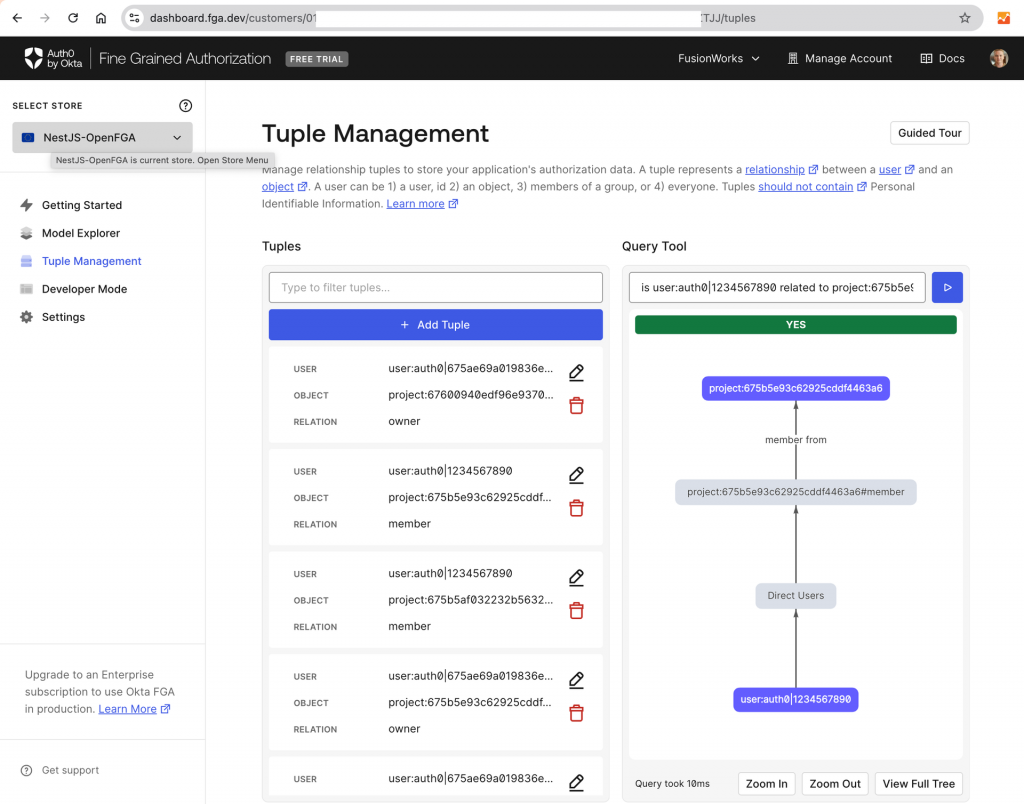
Authorization data is stored in OpenFGA as relationship tuples. They specify a specific user-object-relation combination. Combined with the authorization model they allow checking user relationships to certain objects, which is then used in application authorization flow. In OpenFGA relationships could be direct (defined by tuples) or implied (computed from combining tuples and model).
Let’s illustrate this with a model we will use in our sample project.
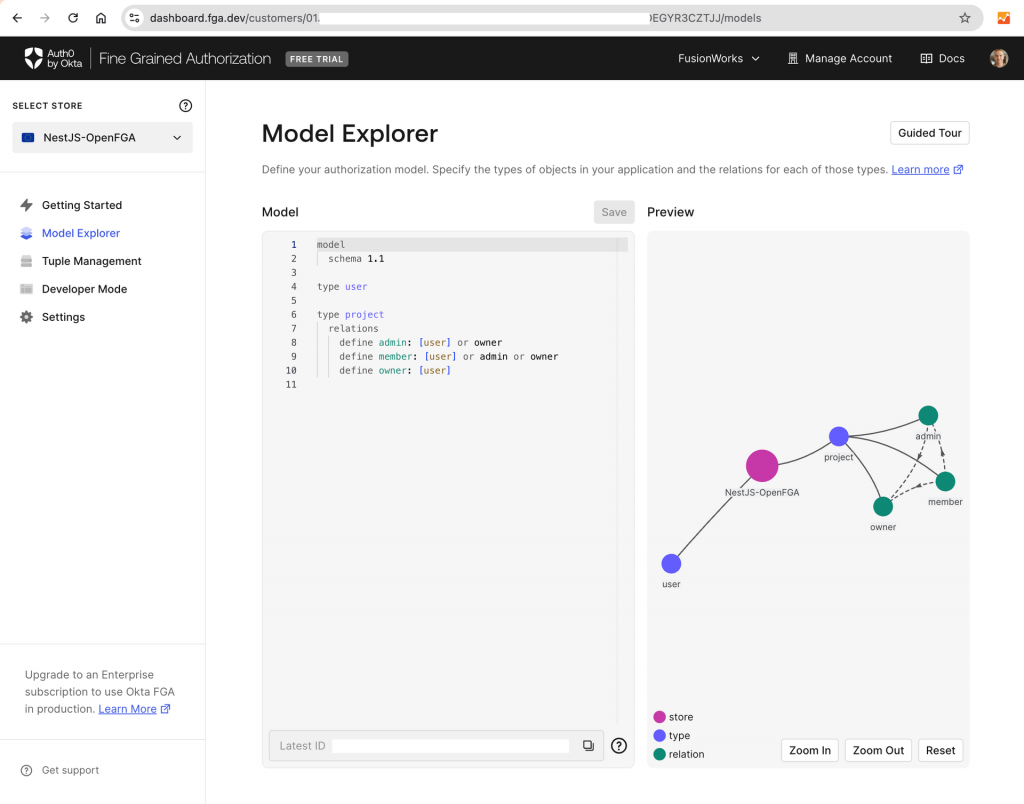
model schema 1.1typeusertypeproject relations define admin: [user] or owner define member: [user] or admin define owner: [user]
Based on this user “user:johndoe“ has direct relationship “member“ with object “project:FusionAI“, while for user “user:gganebnyi“ this relationship is implied based on his direct relationship “owner“ with this object.
At runtime, both the authorization model and relationship tuples are stored in the OpenFGA store. OpenFGA provides API for managing this data and performing authorization checks against it.
The full project source code is located in our GitHub repo. You can check it out and use it for reference while reading the article. If you are familiar with NestJS and Auth0 setup, please skip right to the OpenFGA part.
Setting Up a Basic NestJS Project
Let’s start by setting up a basic NestJS project. Ensure you have Node.js and npm installed, then proceed with the following commands:
Bash
# Install NestJS CLI globallynpminstall-g@nestjs/cli# Create a new NestJS projectnestnewnestjs-auth0-openfga# Getting inside project folder and install dependencies we have so farcdnestjs-auth0-openfganpminstall# We will use MongoDB to store our datanpminstall@nestjs/mongoosemongoose# For easier use of environment variablesnpminstall@nestjs/config# Adding Swagger for API documentation and testingnpminstall@nestjs/swaggerswagger-ui-express
This gives us all the NestJS components we need so far installed. The next step is to create our Projects Rest API.
This will scaffold NestJS artifacts for Projects API and update app.module.ts file. The next step is to create the Project’s Mongoose schema and implement projects Service and ProjectsController.
Our basic app is ready. You can launch it with npm run start:dev and access Swagger UI via http://localhost:3000/api/ to try the API.
Integrating Auth0 for Authentication
Authentication is the first step in securing your application. Auth0 simplifies this process by handling user authentication, allowing you to focus on building your application logic. Auth0 is a SaaS solution and you need to register at https://auth0.com to use it. To integrate Auth0 we will install PassportJS and configure it. Here are the steps.
Now Project API will require you to pass valid authentication information to invoke its methods. This is done by setting Authorization: Bearer YOUR_TOKEN header, where YOUR_TOKEN is obtained during the Auth0 authentication flow.
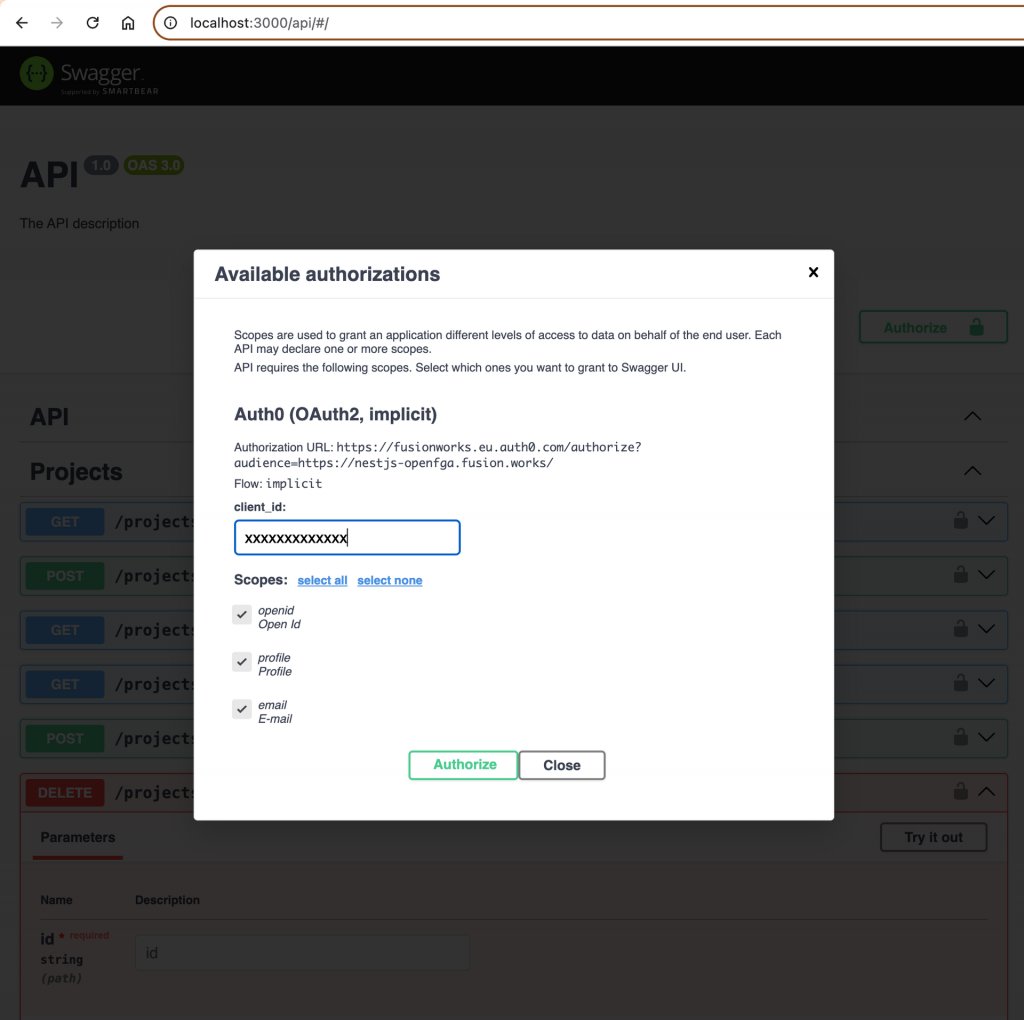
To make our testing of API easier let’s add Auth0 authentication support to Swagger UI
As a result, the Authorize option will appear in Swagger UI and the Authorization header will be attached to all requests.
Implementing OpenFGA for Authorization
With authentication in place, the next step is managing authorization using OpenFGA. We’ll design our authorization model, integrate OpenFGA into NestJS, and build permission guards to enforce access control.
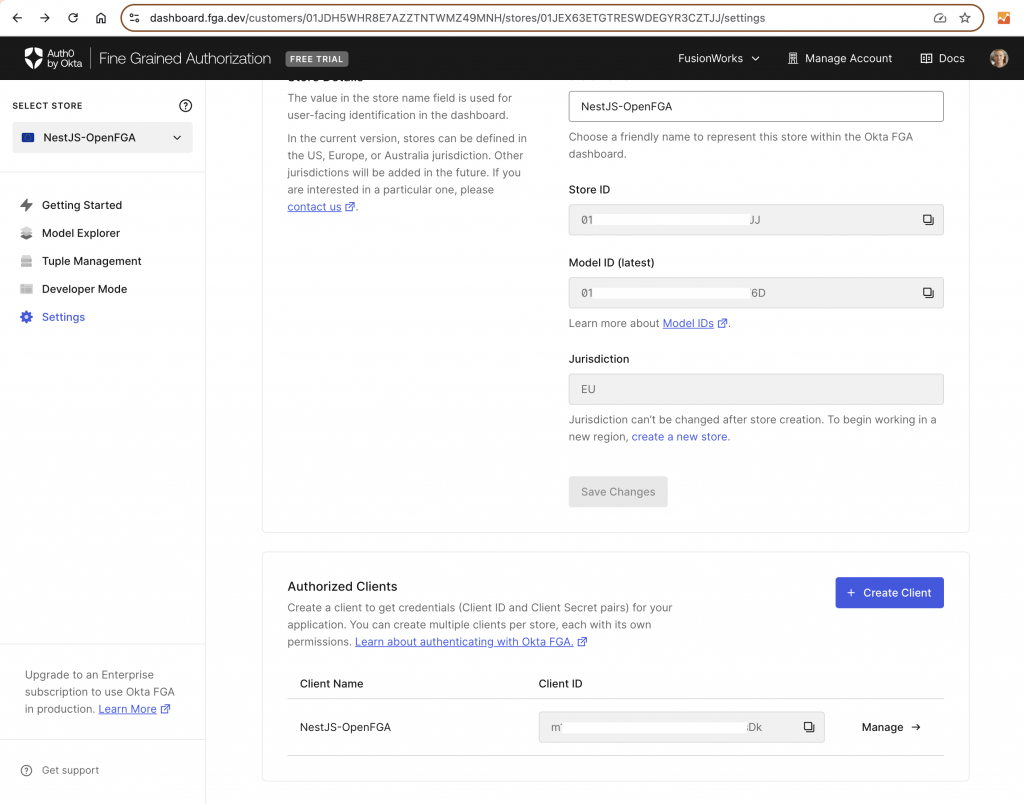
Since OpenFGA is a service you either need to install it locally (Docker Setup Guide | OpenFGA ) or use a hosted analog like Okta FGA. For this tutorial, I recommend using Okta FGA since it has a UI for designing and testing models and managing relationship tuples.
As the first step to implementing authorization, we will define our authorization model and save it in Okta FGA
Bash
modelschema1.1typeusertypeprojectrelationsdefineadmin: [user] or ownerdefinemember: [user] or admindefineowner: [user]
The next step is to create Okta FGA API client
And update our .env with its parameters
Bash
...FGA_API_URL='https://api.eu1.fga.dev'# depends on your account jurisdictionFGA_STORE_ID=FGA_MODEL_ID=FGA_API_TOKEN_ISSUER="auth.fga.dev"FGA_API_AUDIENCE='https://api.eu1.fga.dev/'# depends on your account jurisdictionFGA_CLIENT_ID=FGA_CLIENT_SECRET=...
Now we install OpenFGA SDK and create an authorization module in our app
Now we can implement PermissionsGuard and PermissionsDecorator to be used on our controllers. PermissionsGuard will extract the object ID from the request URL, body, or query parameters and based on object type and required relation from the decorator and user ID from authentication data perform a relationship check in OpenFGA.
authorization/permissions.decorator.ts
TypeScript
import { SetMetadata } from'@nestjs/common';exportconstPERMISSIONS_KEY='permissions';exporttypePermission= {permission:string;objectType:string;objectIdParam:string; // The name of the route parameter containing the object ID};exportconstPermissions= (...permissions:Permission[]) =>SetMetadata(PERMISSIONS_KEY, permissions);
Now let’s see how this integrates with ProjectsController. Besides permissions checking, we will also add the project creator as the Owner and give him and the project admins the possibility to manipulate project members. For easier user extraction from the authentication context, we added a User decorator.
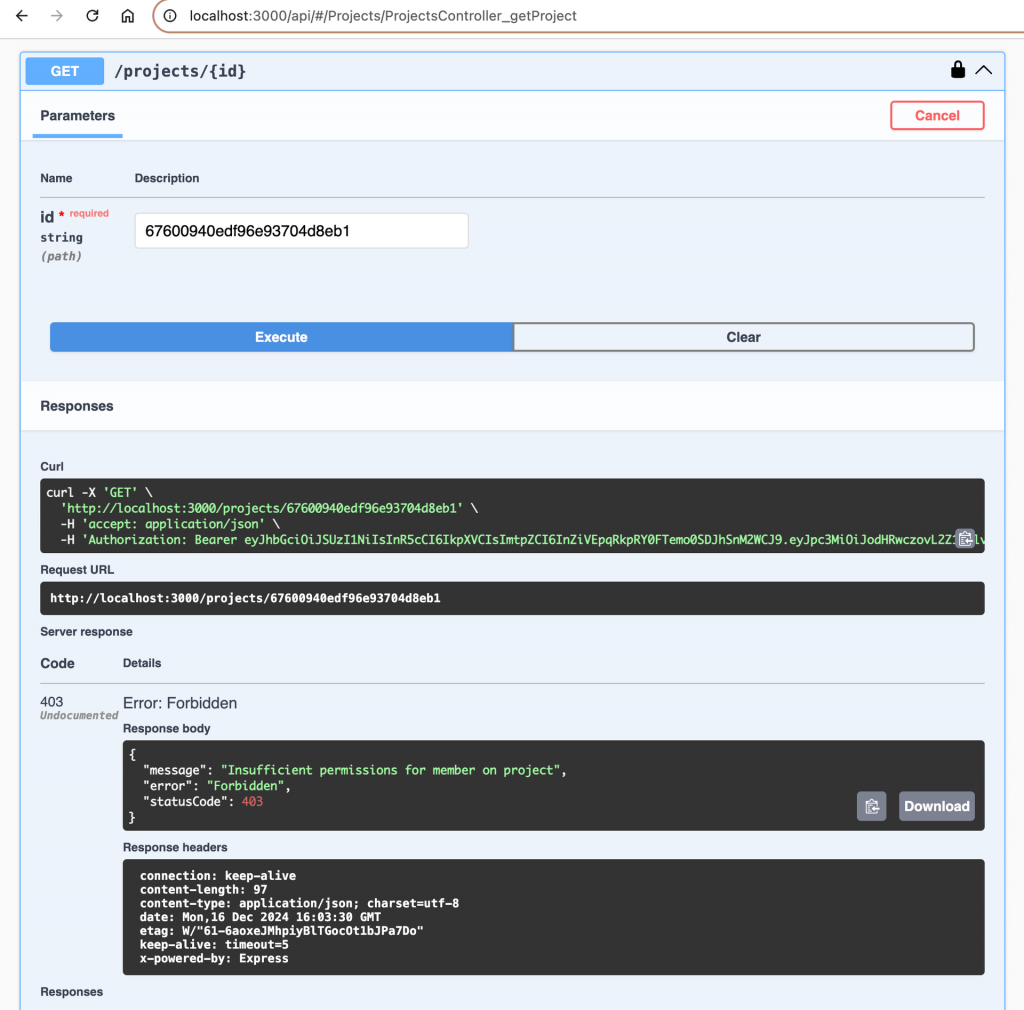
Now if we try to access a project, that we are not a part of we will get an HTTP 403 exception:
Conclusion
In today’s fast-paced web development landscape, establishing a reliable permissions management system is essential for both security and functionality. This article demonstrated how to build such a system by integrating NestJS, OpenFGA, and Auth0.
Key Takeaways
NestJS provided a scalable and structured framework for developing the backend, ensuring maintainable and robust API development.
Auth0 streamlined the authentication process, offering features like social login and multifactor authentication without the complexity of building them from scratch.
OpenFGA enabled fine-grained access control, allowing precise management of user roles and permissions, ensuring that each user—whether Owner, Admin, or Member—has appropriate access levels.
Benefits of This Approach
Enhanced Security: Clearly defined roles reduce the risk of unauthorized access, protecting sensitive project data.
Scalability: The combination of NestJS, OpenFGA, and Auth0 ensures the system can grow with your application.
Maintainability: Using industry-standard tools with clear separations of concern makes the system easier to manage and extend.
Flexibility: OpenFGA’s detailed access control accommodates complex permission requirements and evolving business needs.
Final Thoughts
Building a secure and efficient permissions management system is crucial for modern web applications. By leveraging NestJS, OpenFGA, and Auth0, developers can create a robust backend that meets current security standards and adapts to future challenges. Implementing these tools will help ensure your applications are both secure and scalable, providing a solid foundation for growth in an ever-evolving digital environment.
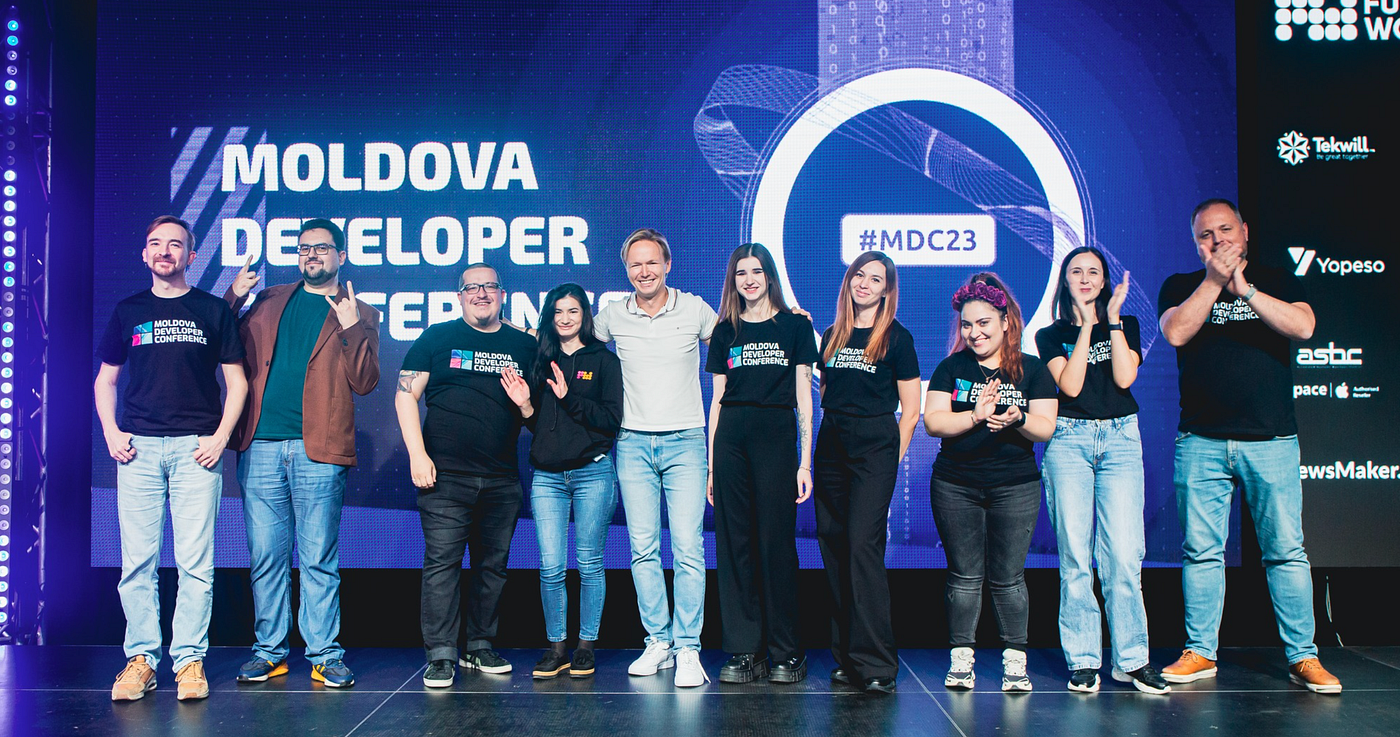
Moldova DevCon is the largest and most prestigious event for developers in Moldova. Bringing together top engineers, tech leaders, and industry giants from across the globe, #MDC offers 2 days of engaging presentations, hands-on workshops, and networking opportunities at the stunning Arena Chisinau, the biggest venue in the country!
We’ve prepared for you something huge this year — a new venue, format, and scale. But why you should be there? Let’s see.
#1 Learn from companies and engineers from all over the world
IBM, Amazon, Electrolux, ASML, Pirate, Germany, Netherlands, South Africa, Sweden, Finland, Croatia, Serbia, North Macedonia, Romania and Moldova — this is the new scale of Moldova DevCon 2024. And you’ll be a part of it.
At #MDC you can expect sessions on cloud computing from Amazon’s engineers, who will dive into cloud infrastructure optimization and serverless architecture. AI and machine learning enthusiasts will have a chance to learn from IBM professionals about integrating AI solutions into scalable systems. Experts from Electrolux will share their insights into IoT (Internet of Things) and how it’s revolutionizing industries globally.
Mobile development is also a hot topic at MDC 2024. We’ll look into Kotlin Multiplatform, showcasing how Android and iOS developers can work more efficiently with shared codebases. There will also be deep dives into Androiddevelopmentand cross-platform solutions.
You’ll also hear from cybersecurity experts discussing the latest in application security and data privacy, particularly in the context of European regulations. DevOps professionals will share best practices for automating infrastructure and improving continuous integration pipelines.
With the technical depth and variety, we’ll ensure that there’s something valuable for every developer, whether you’re looking to specialize or broaden your tech horizons.
#2 Get a job you want
We invited industry leaders to join us as partners and they said YES. Here is the list of companies that will have their booths at the event. Traditionally they are here to offer you something awesome, including job opportunities. You’ll have enough time to go through all of them and explore the opportunities. Don’t miss a great chance to boost your career and build new relations!
Ready to join us? Don’t miss your chance to experience #MDC in full. Use promo code ‘igotomdc’ and grab your ticket now for an exclusive discount. Register here and secure your spot!
#3 Enjoy the time with other tech people
The communication is key. That’s why we hate online formats and focus on events where you can meet and talk with people who think alike.
We’ve carefully curated networking breaks, coffee sessions, and after-event activities to ensure you can meet and exchange ideas with tech professionals, potential employers, and industry leaders. Whether you want to collaborate on projects, discuss the latest innovations, or simply connect with like-minded individuals, MDC provides the perfect environment.
If you go with a Geek ticket — we’ll offer a quiet and all-inclusive Business Lounge where you can meet speakers and partners. Advanced tickets will allow you to attend workshops where you can discuss with speakers the topics you are interested in. Standard tickets will give you access to all the presentations on the main stage, as well as the opportunity to visit our partner stand and start new collaborations.
#4 Rock at the afterparty
Saturday night is going to be unforgettable. We’ve invited Moldova’s legendary rock band, Gindul Mitei, to light up the stage. With a huge setup, special effects, and professional-grade sound, we’re making sure the energy stays high as we celebrate the amazing connections and insights we’ve gathered over two days. Let’s rock together at the MDC afterparty!
It’s Friday evening. November. Maybe not the most colorful time in Moldova, but there’s something that makes you excited. You finish work a bit earlier because tonight is special. You’re heading to Moldova DevCon (#MDC) — an event built for you, by people just like you.
You make your way to Chisinau Arena. It’s chilly, but you know what’s waiting inside — a warm atmosphere and a cup of hot tea. Parking is easy, and there are no long lines, even with so many people arriving. We’ve made sure everything runs smoothly for you. Yes, we organized it for you.
You pass the registration quickly and paperless. In the hall, you find volunteers who guide you to the Main Stage, where you find a seat. The first impression — wow, they’ve really put in the effort! With your seat secured, you grab a well-deserved coffee or tea and something tasty to eat.
#MDC starts
The WOW effect continues when we light up the Main Stage. We spent months to make you shiver from excitement today. You are having a great Friday! A quick welcome speech, and then the presentations begin. We’ve brought in speakers from 10 countries for this edition — guaranteed, you’ll learn something new. You decide whom to listen to and when to catch up with old and new friends for a cup of something hot or a glass of wine.
Don’t forget to check out the partner booths — they’ve got giveaways and offers that just might change your life.
By 8 pm, the official program wraps up. You can either hang out at the Arena with fellow tech enthusiasts or head home to recharge for tomorrow.
If you’ve got a Geek ticket, the night continues with our Wine&Tech party at the Arena’s Business Lounge.
#MDC continues
The second day you come in the morning and we meet you with coffee, tech talks, and new experiences! We’ll spend the whole day together listening to presentations, attending workshops, and chatting. Relax zones, tons of placintas, and glasses of wine together with stunning presentations on the biggest Arena in Moldova!
Check our Agenda and Speakers list — you won’t be bored! The speakers will talk about the hottest topics in tech right now. They’ll cover everything from AI and machine learning to cybersecurity and cloud computing. You’ll hear from local and international pros who are right in the middle of these developments, sharing real-world experiences and actionable tips. Plus, there’s a strong focus on the specific challenges and opportunities developers in Moldova face.
Afterparty
Photo Lev Riseman
At 7 pm, the official #MDC wraps up, but the fun is just beginning. It’s time to celebrate and create memories! Grab a drink — beer, wine, or water — and hit the dance floor. We’ve got a sound setup that’ll blow your mind and body! Gîndul Mîței is performing — just for YOU! And there’s a surprise at the end 😉
Hope you enjoyed the journey that leaves a pleasant aftertaste! But there’s one important thing to mention…
…not going to MDC is OK
Sure, you could skip MDC. You’ll be fine. But when you see all the photos and videos, especially from the afterparty, you might wish you’d been there. And we don’t want you to have that regret (better to regret what you did, not what you didn’t!). So, here’s a promo code ‘igotomdc’ — use it here for a friendly discount and join us!
Final thoughts — let’s talk about those who made this happen.
Partner contribution matters
#MDC budget was always covered by ticket sales only by 50%. This year it’s even less — expenses grew significantly, and ticket prices can’t keep this pace. To cover this we need partners — and they said YES to celebrate those who actually do the digitalization! This year wasn’t an easy one for the tech sector, but these brave companies stood out to help. And my (and hopefully yours) respect and gratitude towards them is enormous. Here is the list of our supporters!
Team
#MDC is our passion project. Every year we have a brave team that spends lots of their time and nerves for you to enjoy this incredible event. You won’t see the majority of them except for the one moment — when we all go on stage for the final bow. And we feel how you bow back — your applause explains WHY we did it. And this is what fills our hearts with love and passion. And we give it back preparing for the next event — the infinite loop of energy that makes this crazy world go round!