Most traders make decisions somewhere between using a spreadsheet and their gut feeling. One is too slow to keep up with the market, the other is too expensive to be wrong about. When Allasso came to FusionWorks, they wanted to give financial professionals a third option: a workspace where a trade could be tested, stress-checked, and understood before any real money moved.
What you are about to read is less a portfolio piece and more a description of how we work. Allasso is the example, but the pattern is the point. We treat companies that hire us as long-term product partners, and the work below is what that looks like when it plays out over a couple of years.
Starting small, on purpose
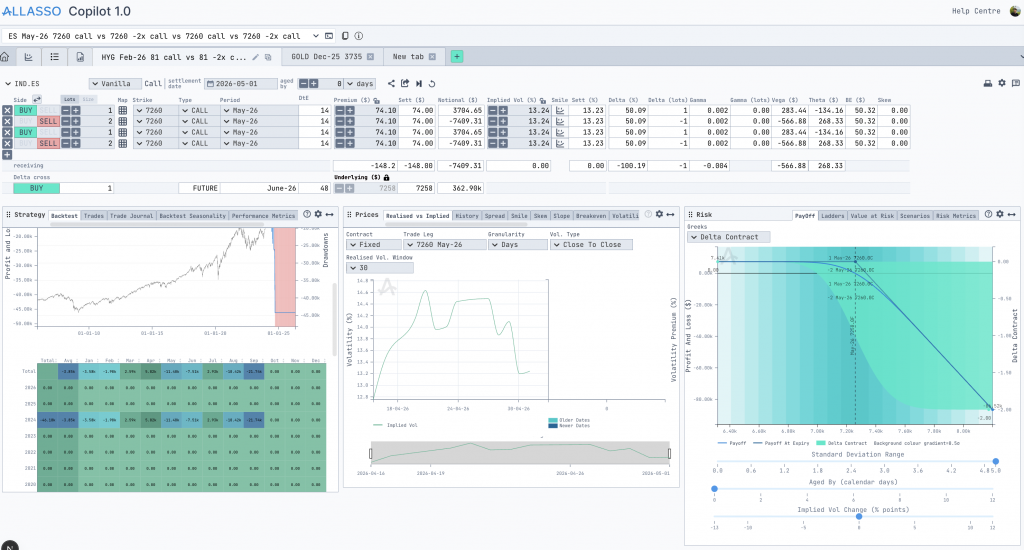
The first version of the product did exactly one thing: the trader picked a single instrument, for example, gold or the S&P 500, and ran “what if” scenarios against it. They could change the price, the volatility (the number traders watch to guess how wild the market is about to get), and the inputs that drive the market underneath, then watch the consequences update in seconds.
The work that used to live in a spreadsheet, calculated by hand and prone to small errors with large costs, now happened inside a tool built for the job. Assumptions could be tested instead of being guessed.
We could have proposed a much bigger first build but we didn’t. Because a smaller first version meant Allasso’s users could touch the product sooner and tell us what was actually missing. That early feedback is what shaped every decision after it.
Letting the product grow from real usage
As traders spent time inside the tool, they started asking for more context around each decision, so we built outward in layers rather than starting over. Historical charts came in to ground the scenarios in what the market had done. Risk analysis arrived next, then calculated outputs, followed by new ways to look at the same trade from different angles. Each addition wrapped around the existing workflow instead of replacing it, which meant nobody had to relearn a tool they already trusted.
This is the part of the partnership we care most about. It is easy to build the thing on the brief. It is harder, and more useful, to keep building in a direction that respects what users have already learned.
Knowing when to throw something away
The first version of the charts was built with a tool called Plotly. It got us moving fast, which was the right call at the time. But as traders pushed the product harder, they needed charts that behaved in very specific ways.
So we moved to D3, which gave us full control over how every chart looked and how every interaction behaved. That switch unlocked the visualizations we couldn’t have built before, and it set up everything that came after. Part of being a real partner is telling a client when it is time to replace something we built ourselves, and then doing the replacing without friction for the users.
Growing past the original scope
Over the last year, the product has grown well beyond the single-screen tool we started with. Together, we built two new modules that opened up entirely new ways of working.
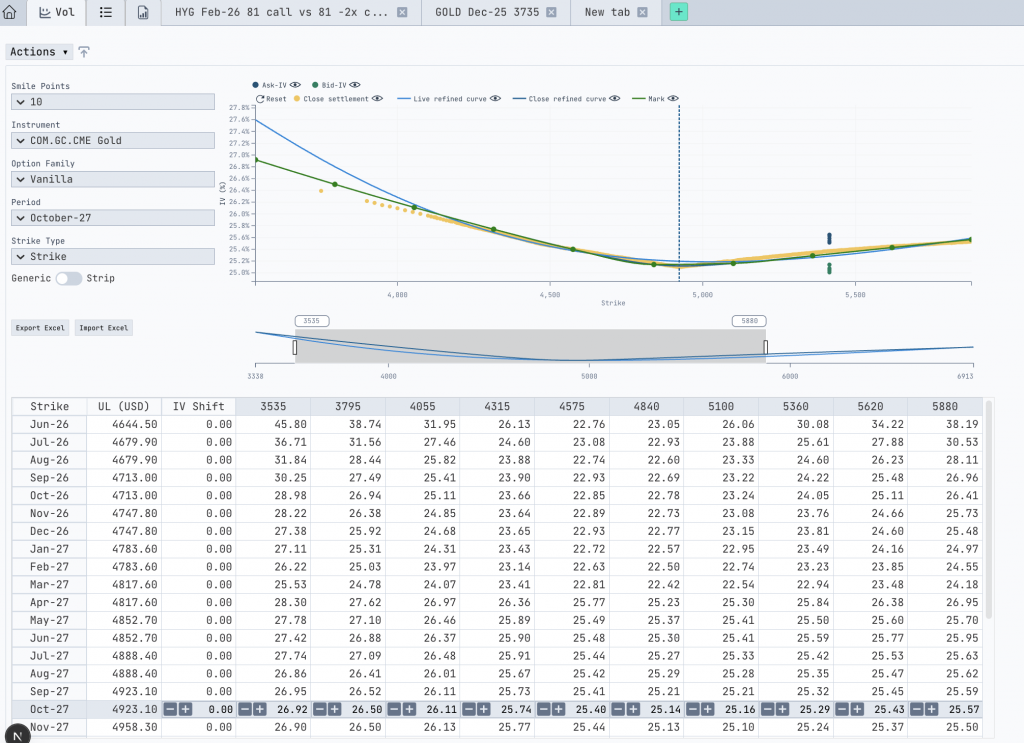
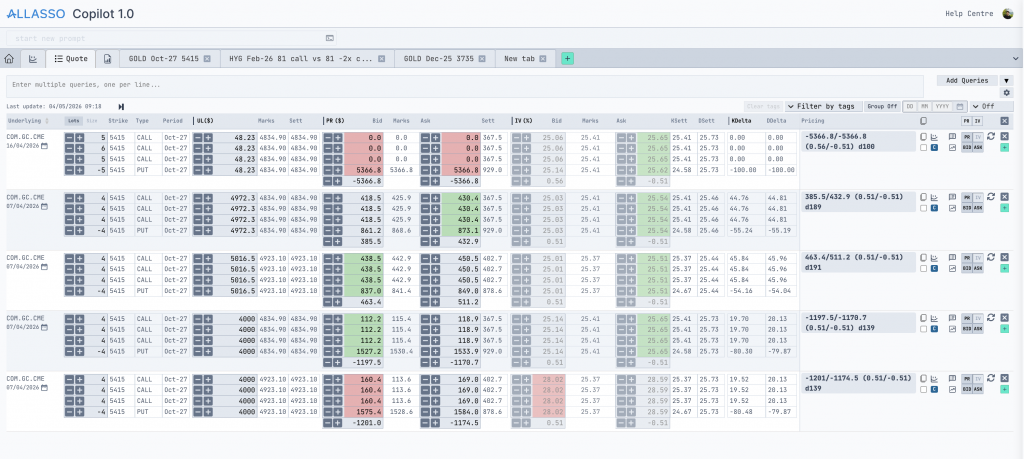
The first, Quotes, lets traders work with several instruments at once. They could compare positions side by side, edit quote structures, and recalculate multiple positions inside a single workflow instead of jumping between tabs. The second, Volatility, gave traders direct, visual control over volatility surfaces and smiles (the maps traders use to price options across different scenarios). They could adjust values by hand, publish the structures they built, and reuse those calculations elsewhere in the platform.
Around this point, something quietly important happened. The separate pieces of the product started talking to each other, and the workspace stopped feeling like a collection of features. It started feeling like one connected environment, which is exactly what a trading tool needs to be.
Meeting traders in their own language
Once the platform was mature, we kept noticing the same small friction – when a trader has an idea, they describe it in shorthand: the thing they want to trade, the period, a few numbers, whether they are betting on the price going up or down. Then they sit down at the screen and translate that shorthand, click by click, into a structure the system understands. The idea is fast. The data entry is slow.
So we built an AI-powered structure recognition directly into the application. A trader can type their idea the way they would say it out loud, naming the underlying (the asset the trade is based on, like gold or an index), the contract period, the strike prices (the price levels where the trade pays off), the quantities, the call and put legs (the individual up-bets and down-bets that make up the position), and the target price. The system reads that shorthand and turns it into a fully formed structure inside the app, ready to test.
The result is a workspace where structure creation is faster, manual input drops, and the tool finally meets traders where they already are, instead of asking them to translate themselves into it. This is the philosophy the whole partnership has run on: watch how the work happens, then shape the product around it.
What we are building next
Today, charts, quotes, volatility analysis, shared structures, exports, and trading calculations all live inside one connected ecosystem. FusionWorks is still building with Allasso, and the next phase is taking some of the individual chart and analytics components out into standalone libraries so they can run anywhere: JavaScript apps, Python notebooks, future trading products that have not been designed yet.
The product started as one instrument on one screen. It became a set of tools shaped around the way traders work – 100 features built across 700 tasks, because the team behind it kept pushing the boundaries and we kept showing up with the right solutions. That, more than any single feature, is what we mean when we say partnership.
You built something real. You took an idea, opened Lovable, and turned it into a working product: a frontend, backend logic, a database, auth. It works and users are signing up. But now you’re starting to feel the friction.
Maybe Lovable went down and your app went with it. Maybe someone on your team pushed a change that broke something in production and there was no review process to catch it. Maybe you just want to know that your production environment is yours: stable, predictable, and under your control.
The good news: you don’t have to abandon Lovable to get there. You can keep building in Lovable while running a proper production environment alongside it. That’s exactly what we help founders do at FusionWorks, and this article walks you through how we approach it.
The Core Idea: Lovable for Development, Production on Your Terms
The migration most people imagine is an all-or-nothing move: rip everything out of Lovable, rewrite what you need, and never look back. That’s expensive, risky, and usually unnecessary, especially at the stage where you’re still iterating fast.
What we propose instead is a dual-environment setup:
Lovable stays your rapid prototyping and development tool. Founders and non-technical team members can keep making changes there.
A separate production environment runs on infrastructure you control – Cloudflare Pages for the frontend, Supabase’s own cloud for the backend and database.
GitHub sits in the middle, syncing changes from Lovable to production through pull requests and a proper review process.
This means you get the speed of Lovable and the stability of a controlled production deployment. Changes flow from Lovable through GitHub, get reviewed (by your team or ours), and only then reach your users.
What Lovable Is Actually Made Of
Before you can migrate anything, you need to understand what Lovable assembled for you under the hood.
Lovable uses Supabase as its backend layer. Your database, your Edge Functions, your authentication, it all lives in a Supabase project that Lovable manages on your behalf. The frontend is a standard SPA (Single Page Application) built with Vite and React, and Lovable handles the build and deployment for you.
When you connect Lovable to GitHub (which you should do immediately if you haven’t), you get a repository with two main areas: a src folder containing your frontend code and a supabase directory containing your Edge Functions code and database migrations.
That repository is your escape hatch. Everything you need to run independently is in there, with a few catches we’ll get to shortly.
The Migration Path: Step by Step
1. Audit Your Repository
Start by pulling down your Lovable-connected GitHub repo and actually reading through it. Pay special attention to two things:
Database migrations. Lovable generates these as you build, but the ordering isn’t always clean. We’ve encountered cases where a security policy for a table was created in a migration that ran before the migration that created the table itself. Go through the migration files in order and make sure each one only references objects that already exist at that point in the sequence. You may need to reorder or merge a couple of files.
The config.toml file in the supabase directory. This contains your Supabase project configuration: the project ID it’s linked to, which features are enabled, and importantly, the JWT verification settings for your Edge Functions. We’ll come back to this.
2. Set Up Your Production Infrastructure
We recommend the following stack for most Lovable migrations – it’s cost-effective, gives you full control, and each piece can be swapped independently later:
Supabase Cloud for your database, Edge Functions, and authentication. You’ll create a new Supabase project directly on supabase.com. This gives you access to features and configuration options that Lovable’s managed Supabase instance doesn’t expose.
Cloudflare Pages for your frontend. The free tier is generous and more than sufficient for most early-stage products. It gives you global CDN, automatic builds from GitHub, and preview deployments for every branch.
The key benefit of this split: each piece runs on infrastructure optimized for its purpose, and you’re not locked into any single vendor.
3. Navigate the Supabase Gotchas
This is where real-world experience saves you hours of debugging. Here are the issues we’ve hit and solved:
API key types. Supabase has different types of API keys, and Lovable may have been using legacy keys. Before you update your codebase to use the new project’s keys, check which type Lovable was using and make sure you match it or deliberately migrate to the newer format.
JWT verification on Edge Functions. By default, Supabase Cloud enables JWT verification on all Edge Functions. Lovable typically disables it. If you deploy your functions and immediately start getting 401 Unauthorized errors even though your keys are correct, this is almost certainly the cause. Check that your config.toml has verify_jwt = false under each function definition or better yet, take this opportunity to properly implement JWT verification.
Data API settings. The inverse problem: Lovable enables the Data API by default, but a fresh Supabase project has it disabled. If your Edge Functions are calling Supabase’s REST API internally, you’ll need to flip this on.
4. Deploy Your Frontend to Cloudflare Pages
Connect your GitHub repository to Cloudflare Pages and set up a build. A few things to watch for:
The lockfile problem. Cloudflare’s default build tool is Bun, and if there’s a bun.lock or bun.lockb file in your repo (Lovable may have created one), Cloudflare will use Bun regardless of what you want. If your project was built with npm, delete the Bun lockfile from your repo. This avoids subtle dependency resolution differences that can cause build failures.
SPA routing. This one bites everyone. Lovable handles SPA routing internally and doesn’t export any routing configuration to your repo. When you deploy to Cloudflare Pages, navigating directly to any route other than / will give you a 404. You need to configure Cloudflare to serve your index.html for all routes. The simplest approach: add a _redirects file to your public folder with /* /index.html 200.
Branch configuration. Since we’re maintaining backward compatibility with Lovable, we recommend creating a dedicated branch for your production deployment (e.g., production). Configure Cloudflare Pages to build from this branch. Changes from Lovable flow into main, get reviewed, and are merged to production when ready.
Domain and auth settings. Once your Cloudflare deployment is live (either on a custom domain or the preview URL), go back to your Supabase project and update the URL Configuration in Authentication settings. Without this, OAuth flows and email links will point to the wrong place.
5. Handle the Lovable AI Dependency
This one catches people off guard. If your app uses any AI features – chatbots, summaries, document Q&A, sentiment analysis, image understanding – Lovable provides those through its own AI proxy called Lovable AI. It gives your app access to models like Gemini, GPT-5, and others without requiring you to set up API keys or billing with providers directly. It just works inside Lovable.
The problem is that Lovable doesn’t expose this API for use outside their platform. Once your app is running on your own infrastructure, any feature that calls Lovable AI will simply stop working.
You have a few options here, and which one you pick depends on how you want to manage the transition:
Option A: Replace with OpenRouter. This is our recommended approach for most cases. OpenRouter gives you a single API that routes to dozens of LLM providers: Anthropic, Google, OpenAI, and more. You swap out the Lovable AI calls for OpenRouter calls, keep one API key, one billing account, and you can switch between models without changing your code. It’s the closest equivalent to what Lovable AI was doing for you.
Option B: Go direct to providers. If you know exactly which model you need (say, Claude for your chatbot, Gemini for image analysis), you can integrate with each provider’s API directly. More control, but more API keys and billing relationships to manage.
Option C: Make it configurable. This is the approach we often take when founders want to keep building in Lovable while running production separately. You abstract the AI call behind a configuration flag – in the Lovable development environment, it uses Lovable AI; in production, it routes through OpenRouter or a direct provider API. Same codebase, different backends depending on where it’s running. This preserves full backward compatibility with Lovable while giving production its own reliable AI layer.
Whichever route you choose, the code changes are usually straightforward, Lovable AI calls follow a standard pattern, and replacing them with an OpenRouter or direct API call is mostly a matter of swapping the endpoint and adding an API key from environment variables.
6. Establish the Sync Workflow
This is where the real value of our approach becomes clear. Here’s how the day-to-day workflow looks:
Founders and team members build in Lovable as they always have. Lovable pushes changes to the main branch on GitHub.
A pull request is created from main to production (this can be automated).
The PR gets reviewed, either by your team or by FusionWorks engineers. This is the quality gate. We check for breaking changes, security issues, and anything that shouldn’t go to production without testing.
Once approved, changes merge to production and Cloudflare automatically builds and deploys.
Professional development work (bug fixes, performance improvements, features that need proper engineering) happens on feature branches, goes through its own PR process, and merges to production independently.
This gives you the best of both worlds: Lovable’s speed for rapid iteration and a professional engineering workflow for production stability.
Why This Matters
We’ve seen it too many times: a founder builds something great in Lovable, gets real users, and then hits a wall. Lovable has an outage and their product goes down. An accidental change breaks something critical. There’s no staging environment, no review process, no way to roll back.
Going from a working prototype to a production-grade setup doesn’t have to mean a complete rewrite. It means putting the right infrastructure and processes around what you’ve already built.
At FusionWorks, we’ve been building production software for over a decade. We know how to take what you’ve created in Lovable, which is real, working code, and give it the production foundation it deserves. And we do it in a way that lets you keep moving fast in Lovable while your production environment stays rock solid.
FusionWorks helps founders migrate from AI-powered platforms to production-grade environments. If you’ve built something in Lovable and you’re ready for production stability without slowing down, get in touch.
For more than a decade, FusionWorks has mostly preferred time-and-materials projects. Not because we didn’t like fixed prices, but because they rarely worked in the real world of modern software development.
In Agile, nobody writes 200-page “waterfall” specifications anymore. Requirements evolve. Users learn what they actually need only when they finally see the first version. And every small change, even a reasonable one, requires human time. But human time is slow and expensive.
So, historically, fixed-price meant one of two things:
You load the project with a massive risk buffer, which nobody likes.
You accept the risk and pray that the requirements won’t shift too much, which they always do.
And that’s why, even when clients pushed for fixed prices, we were careful, conservative, and preferred T&M. We wanted to always deliver what the client really needed, not just what’s written in the document.
Then something fundamentally changed.
AI Changed the Equation
With angen.ai and our internal “AI-at-every-stage” development pipeline, the nature of change transformed itself.
The real cost of change has never been the conversation. It’s not about writing a sentence like “add a filter here” or “extend this workflow.” The real cost was always in the coding.
Developers needed a day or two (sometimes a week) to rewrite pieces of the system. And multiplied by any European rate, this becomes real money, which is exactly why fixed-price budgets used to be so fragile.
AI broke that bottleneck. Today, our teams can:
regenerate modules in hours, not days
rewrite architecture-consistent code in bulk
apply change requests extremely fast
keep code quality, patterns, and standards intact
maintain predictable velocity because AI removes human bottlenecks.
We suddenly have more “budget room” inside the same fixed price.
If earlier 80–90% of the budget was spent on pure coding effort, now AI reduces that dramatically. That free space can absorb many of the natural requirement shifts that happen during a real project without blowing up the budget, team morale, or delivery timeline.
Fixed Price Becomes Fair Again
This new reality allows us to offer fixed-price projects in a way that feels healthy for both sides.
For clients
predictable budget
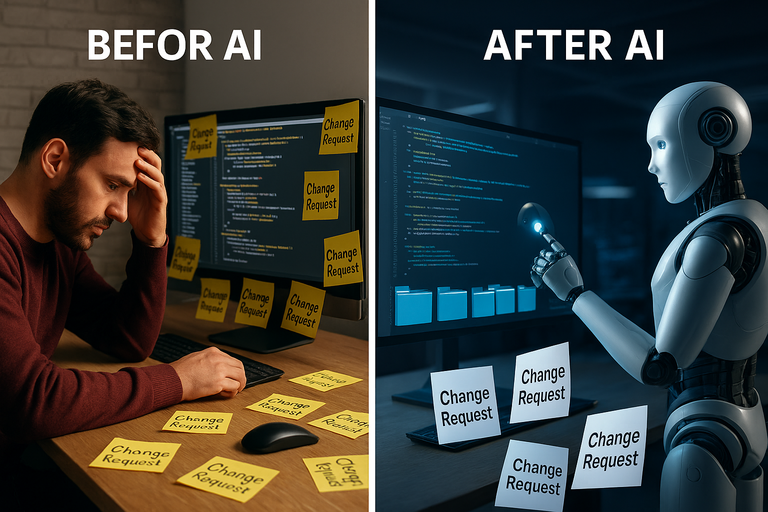
less fear of the classic “change request” stress
faster delivery
more flexibility during development
same quality, but multiplied by AI speed.
For us
less risk
more consistency
less time wasted on manual coding
more space to handle changes within the planned scope
a clear, reliable delivery pipeline powered by angen.ai.
We are no longer afraid that a small product correction will cost two weeks of human time. Now it’s usually a couple of hours of AI-assisted regeneration plus human supervision.
A New Era for Our Delivery Model
So yes, for the first time in many years, we at FusionWorks become genuinely open to fixed-price projects again. Because our capabilities changed.
AI makes software development faster, more predictable, and more resilient to changes. And when the coding bottleneck shrinks, the whole fixed-price model becomes much more practical and much more fair.